Bug #1561
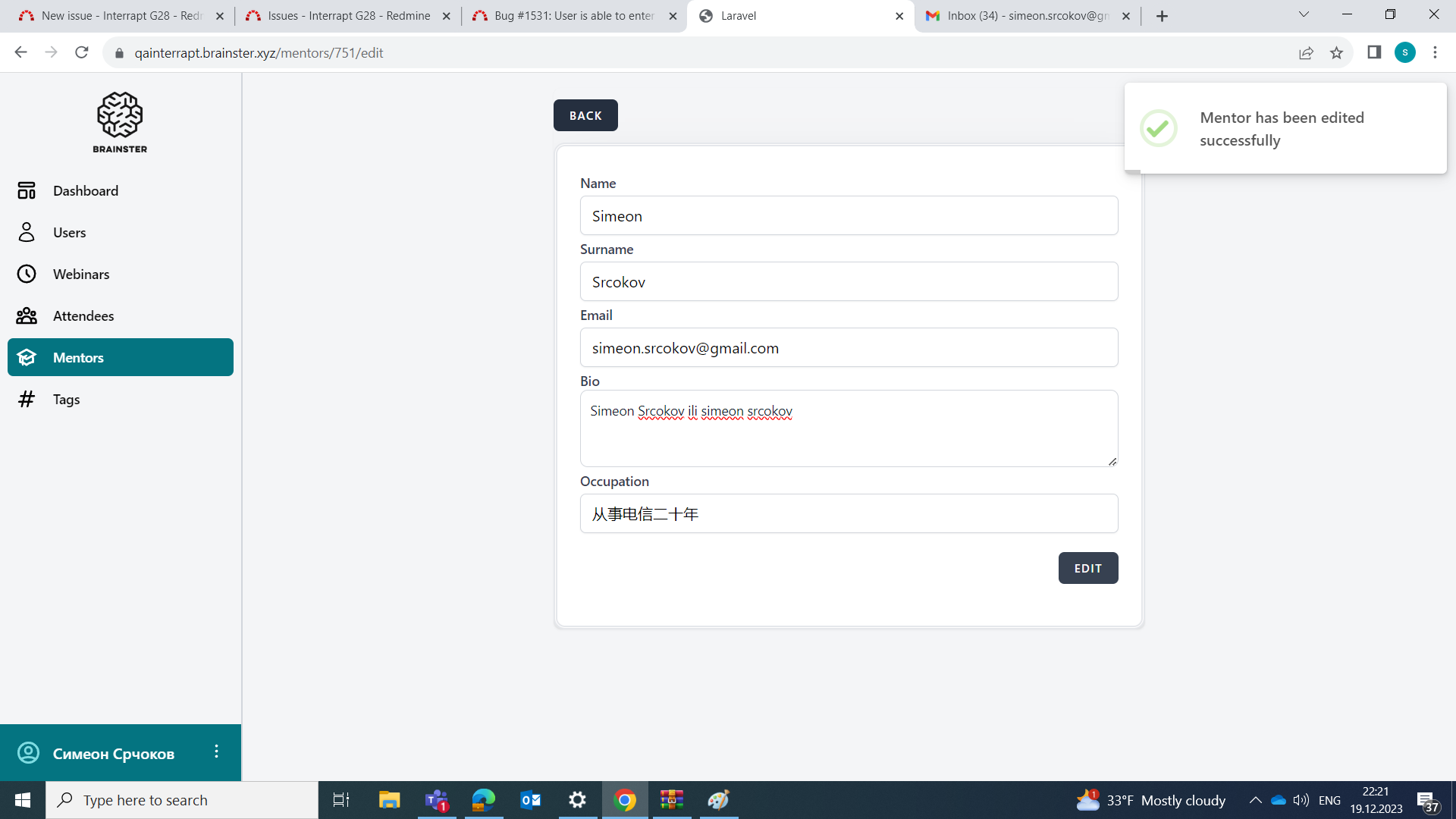
openUser is able to enter chinese characters in "Occupation" field
0%
Description
Description
While creating new mentor, user is able to enter chinese characters in occupation field
Precondition
User must be navigate on https://qainterrapt.brainster.xyz/dashboard
Steps to reproduce:
1.Click on Create button located in mentors menu
2.Fill in the "Name" field with valid data (minimum 3 and maximum 25 characters in length, alphabetic characters (latin and cyrillic), all letter cases (lower and upper), special characters (only "-" and ".") and spaces)
3.Fill in the "Surname" field with valid data alphabetic characters (latin and cyrillic) ,(minimum 3 and maximum 25 characters in length,numbers are not allowed, special characters (only "-" and ".") and spaces)
4.Fill in the "Email" field with valid data (containing email prefix and an email domain)
5.Fill in the "Bio" field with valid data (minimum 20 and maximum 300 characters in length
6.Fill in the "Occupation" field with chinese letters
7.Click on Create button
Expected result
User should not be able to enter chinese characters in Occupation field and a message should be shown that the name field is required in red
letters
Files
No data to display