Bug #1609
open[Webinars] Same values in start date and end date field are accepted
0%
Description
- Environment **
https://qainterrapt.brainster.xyz/login
Mozilla Firefox version 120.0.1 (64-bit)
- Description **
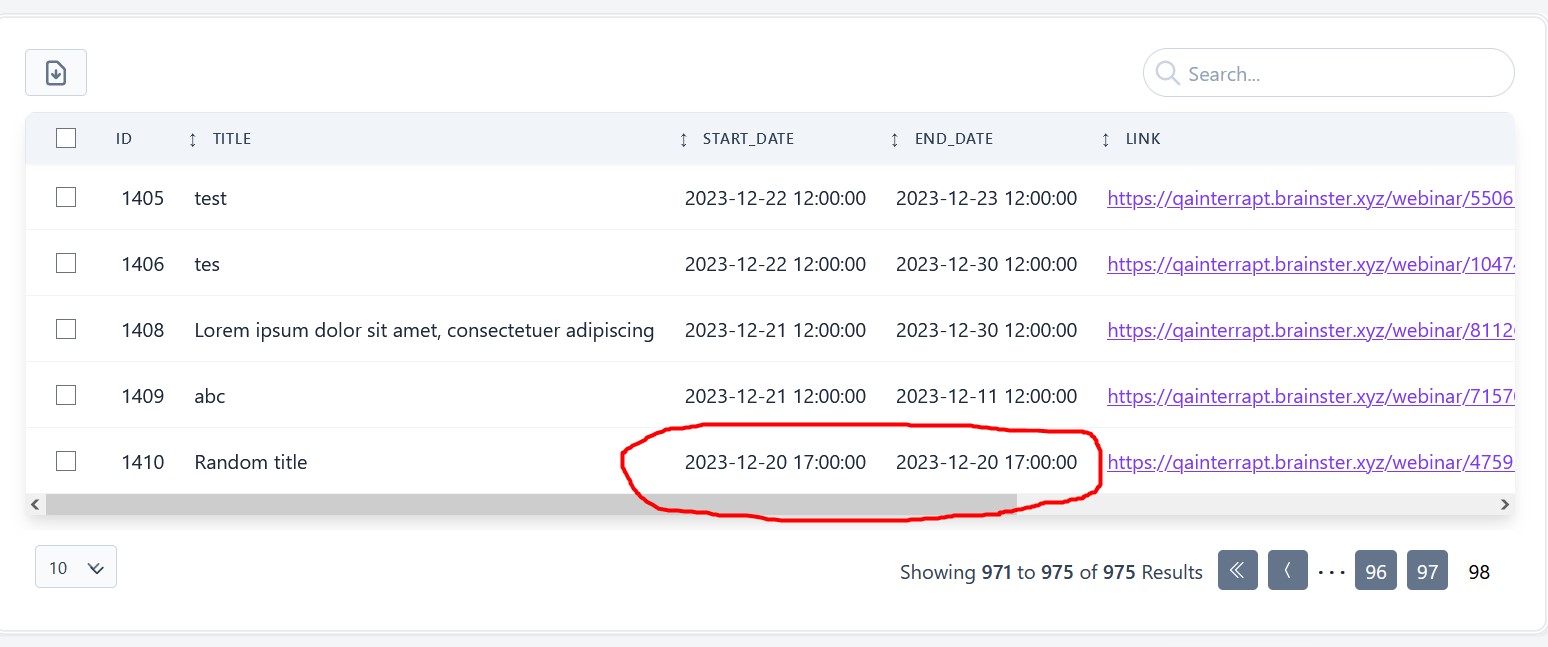
User is able to create a webinar with same values in start and end date field.
- Preconditions **
User is registered and logged in.
- Steps to reproduce **
1. Click on the "Webinars" button in the navigation pane.
2. Click on the "CREATE" button in the top right corner.
3. Click on the "Title" field and enter valid title.
4. Click on the "Description" field and enter valid description.
5. Click on the "Start Date" field and select valid date format. [2023-12-20; 17:00 PM]
6. Click on the "End Date" field and select same date format as Start Date. [2023-12-20; 17:00 PM]
7. Enter a valid link in the "LINK" field.
8. Upload a valid image by clicking on the "Choose file" button.
9. Select a mentor from the drop - down list in the "Mentor" field.
10. Select a tag from the drop - down list in the "Tag" field.
11. Click on the "CREATE" button.
- Expected results **
The webinar should not be created and error message for invalid end date should be displayed.
- Actual results **
The webinar is created and no error message is displayed.
Files
Updated by Nikola Shendov over 2 years ago
- File Screenshot_1.jpg Screenshot_1.jpg added
- Description updated (diff)
Updated by Nikola Shendov over 2 years ago
- Subject changed from [Webinars] The user should not be able to create a webinar with the same values in start date and end date field to [Webinars] Same values in start date and end date field are accepted when creating a webinar
- Description updated (diff)
Updated by Nikola Shendov over 2 years ago
- Subject changed from [Webinars] Same values in start date and end date field are accepted when creating a webinar to [Webinars] Same values in start date and end date field are accepted