Actions
Bug #2057
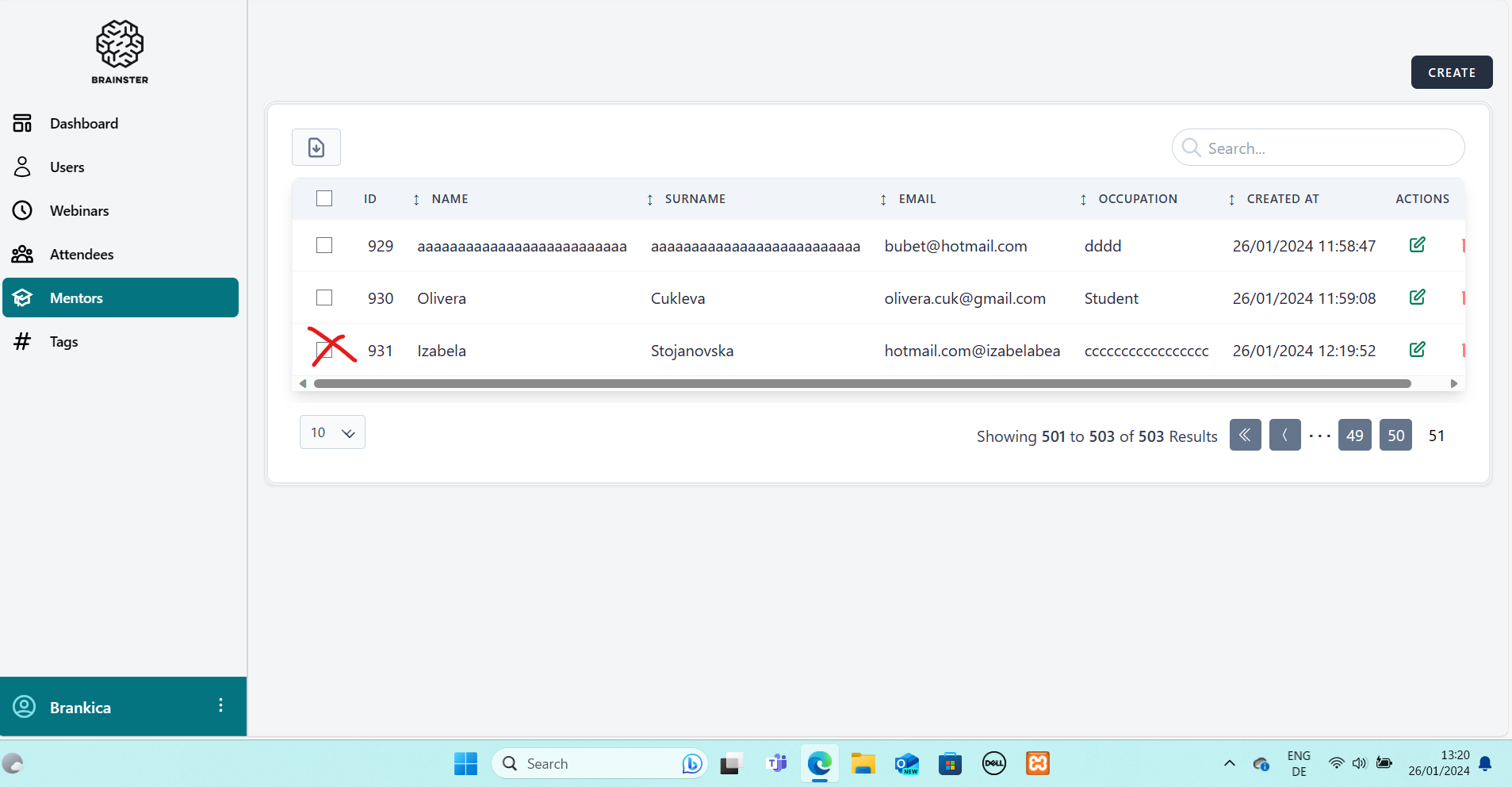
openUser is able to create a Mentor by writing the domain on the left of the @ in the email input field
Start date:
01/26/2024
Due date:
% Done:
0%
Estimated time:
Description
Description:
User is able to create a Mentor by writing the domain on the left of the @ in the email input field
Precondition:
The user should be logged in the Interrapt page
Steps to reproduce:
1. User is navigated to https://qainterrapt.brainster.xyz/mentors/create
2. Fill the required fields as per specification
3. Fill the Email input field with "hotmail.com@izabelabea"
4. Click CREATE button
Expected result:
A message that the Email input field is required in red
letters should appear and Mentor should not be created.
Actual result :
A new Mentor was successfully created.
Platform :
OS Windows 10
Files
| Screenshot 2024-01-26 132009 email1.png (192 KB) Screenshot 2024-01-26 132009 email1.png | Actual result, Mentor created |
No data to display
Actions