Bug #2437
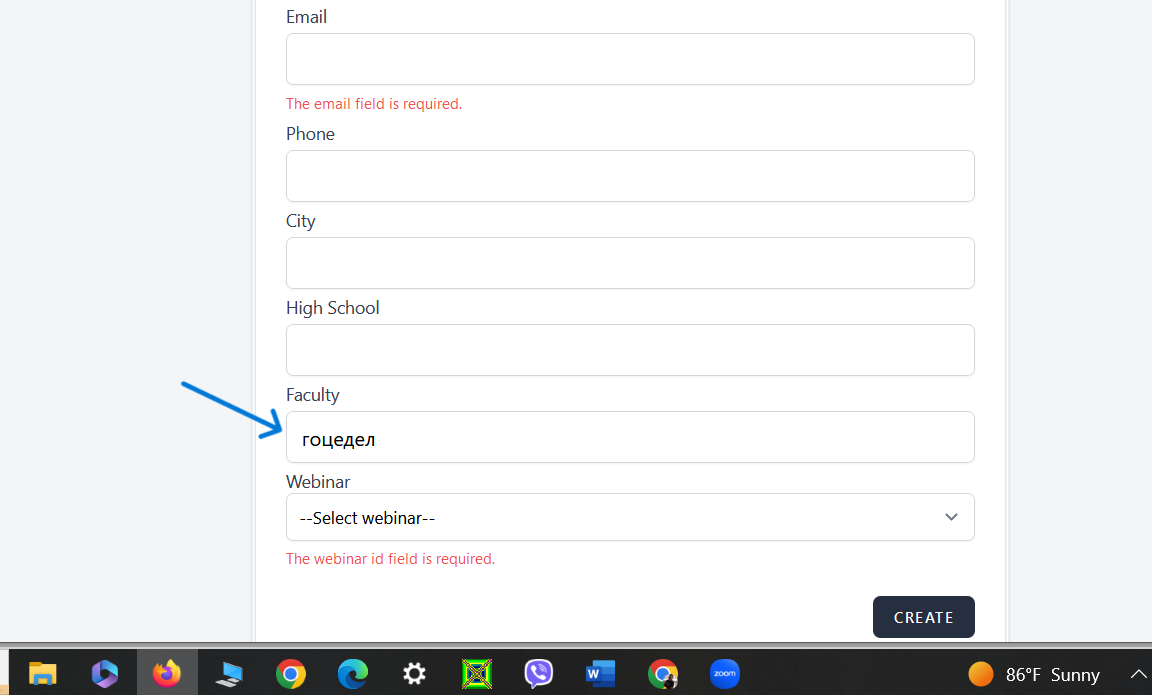
openthe faculty field do not displays an error message
0%
Description
Description : When attempting to put a characters below minimum length sistem do not display an error massage
Steps to reproduce
1. Open the e-learning platform's registration page.
2 .Enter valid alphabetic characters
(Latin and Cyrillic) below
the minimum length (9 characters).
Expected results . The system should displays an error message indicating
that the faculty field must be at least 10 characters long.
Actual Results the faculty field do not displays an error message
Files
Updated by Stojche Ivanovski about 2 years ago
Description : When attempting to put a characters below minimum length sistem do not display an error massage
Steps to reproduce
1. Open the e-learning platform's registration page.
2 .Enter valid alphabetic characters
(Latin and Cyrillic) below
the minimum length (9 characters).
Expected results . The system should displays an error message indicating
that the faculty field must be at least 10 characters long.
Actual Results the faculty field do not displays an error message
Environment
Google Chrome Version 125.0.6422.142
https://qainterrapt.brainster.xyz/