Improvement #2462
open[Users] The 'Eye' icon is not displayed next to the 'Password' field
0%
Description
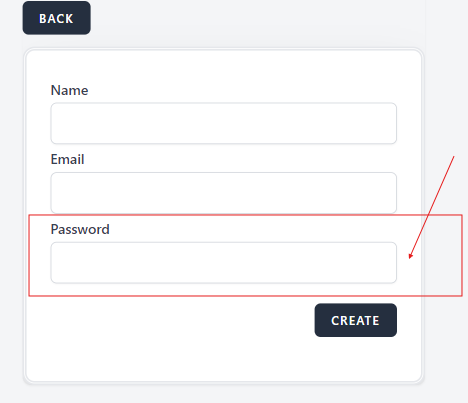
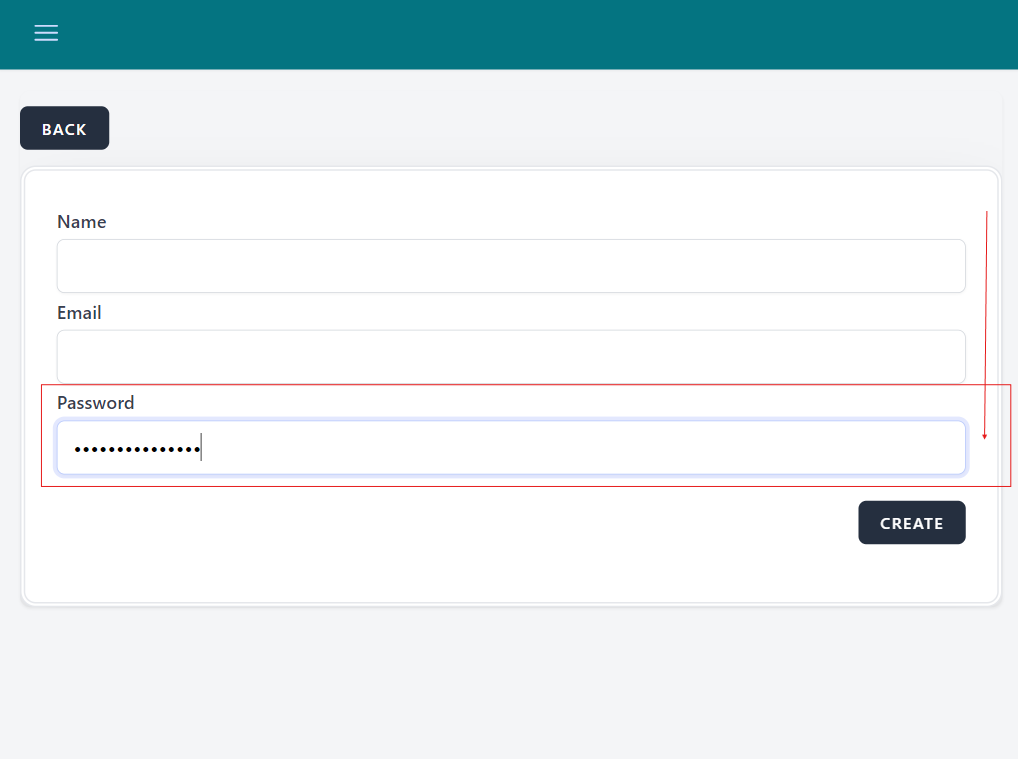
The 'Eye' icon is not displayed next to the 'Password' field, preventing users from toggling password visibility.
Environment
Platform/OS: Google Chrome
Version: 125.0.6422.142 (Official Build) (64-bit)
Device: iPad Pro
Dimensions: 1366 x 1024
URL: https://qainterrapt.brainster.xyz/users
Precondition
The user must be preregistered
Steps to reproduce
1. Navigate to https://qainterrapt.brainster.xyz/login
2. Log in with valid credentials
3. Click on the 'Hamburger' menu on the upper left corner of the page
4. Click on 'Users' in the sidebar menu
5. Click on the 'CREATE' button on the upper right corner of the page
6. Navigate to the 'Password' field
7. Observe the absence of the 'Eye' icon
Expected Result
An 'Eye' icon should be present next to the 'Password' field, allowing users to toggle password visibility.
Actual Result
The 'Eye' icon is not displayed next to the 'Password' field.
Files
Updated by Andrijana Mitrevska about 2 years ago
- Subject changed from [USER] The 'Eye' icon is not displayed next to the 'Password' field to [Users] The 'Eye' icon is not displayed next to the 'Password' field
Updated by Andrijana Mitrevska about 2 years ago
- Description updated (diff)
- Priority changed from Medium to Low