Bug #2523
open[Mentors] The 'email' field accepts using spaces in the email prefix
0%
Description
Environment
Google Chrome Version 125.0.6422.142 (Official Build) (64-bit)
Description
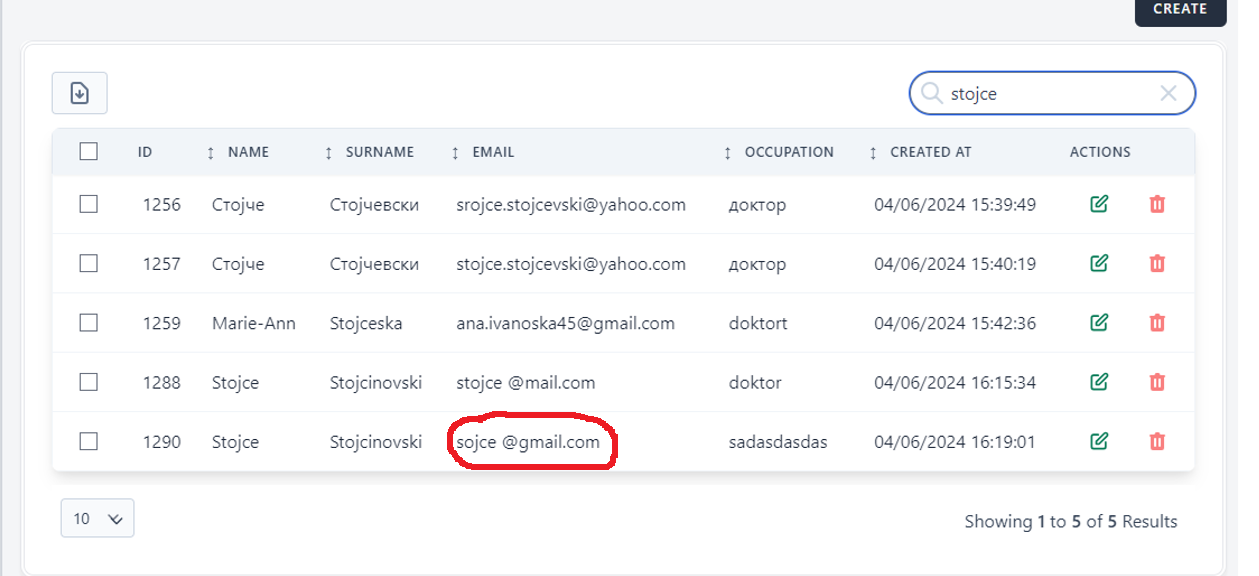
When trying to create a new mentor and entering the characters for the email prefix using spaces and valid format for the email domain the field accepts the input.
Steps to reproduce
1. Log in to the application.
2.Click on 'Mentors'.
3.Click on the 'Create' button.
4.Fill in the 'Email' field.
Expected Result
After the user has logged in and has clicked on 'Mentors' and on the 'Create' button and filled the 'email' field with prefix and domain but
using spaces in the email prefix, the field should not accept the input and error message should be displayed.
Actual Result
After the user has logged in and has clicked on 'Mentors' and on the 'Create' button and fills the 'email' field with prefix and domain but
using spaces in the email prefix, the field accepts the input.
Files