Bug #2526
open[Atendees] "Surname" field - invalid characters
0%
Description
Description
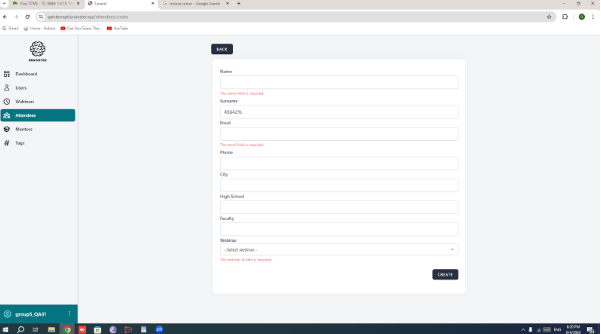
System should prevent users from entering the Surname with invalid characters other than alphabetic characters (both Latin and Cyrillic)
Environment
Google Chrome Version 126.0.6478.56 (Official Build) (64-bit)
https://qainterrapt.brainster.xyz/
Windows 10
Steps to Reproduce
1. Navigate to https://qainterrapt.brainster.xyz/
2. Navigate to the login page
3. Navigate to the attendee page from admin dashboard
4. Click on the "Create Attendee" Button
5. Click on the "Surname" field.
6. Enter a Surname with invalid characters such as numbers, symbols other than alphabetic characters (both Latin and Cyrillic)
Expected results
Error message should be displayed that the "Surname" field is
required in red letters.
Actual results
Error message is not displayed that the "Surname" field is
filled with invalid characters.
Files
No data to display