Actions
Bug #2544
openFaculty field does not display an error message
Start date:
06/12/2024
Due date:
% Done:
0%
Estimated time:
Description
When attempting to the Attendees page, the field of Faculty does not display an error message.
Steps to reproduce
1. Open the https://qainterrapt.brainster.xyz/attendes
2. Click on the Create button positioned in the right upper corner and Fill in the required details and leave the filed 'Faculty' empty.
3. Click on the 'Create' button positioned on the right-down corner
Expected results
After clicking the "Create" button, the error should be displayed under the 'Faculy' field.
Actual Result
Upon not filling out the "Faculty" field and clicking on the 'Create' button, does not display an error message that the field is empty.
Files
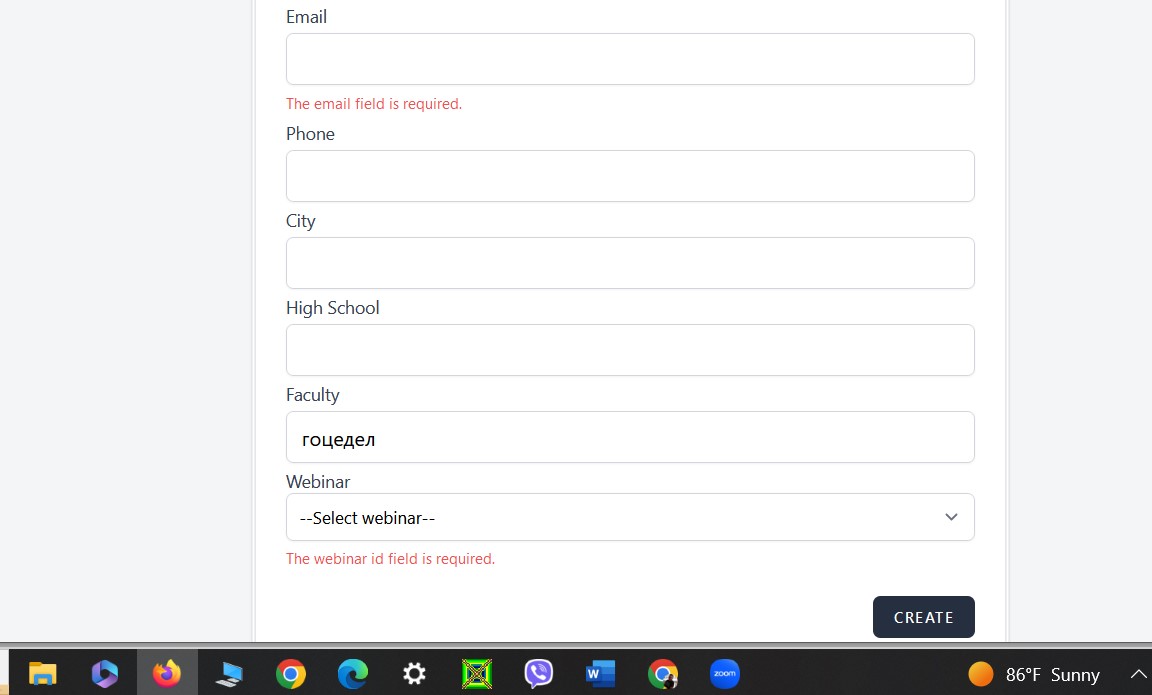
Updated by Ema Dimitrovska about 2 years ago
- File Faculty field.jpg Faculty field.jpg added
- Subject changed from Faculty field do not displays an error message to Faculty field does not display an error message
- Description updated (diff)
Actions