Bug #2604
open[Mentors] A message indicating that the email field must be filled in with a valid email address is not displayed
0%
Description
Description:
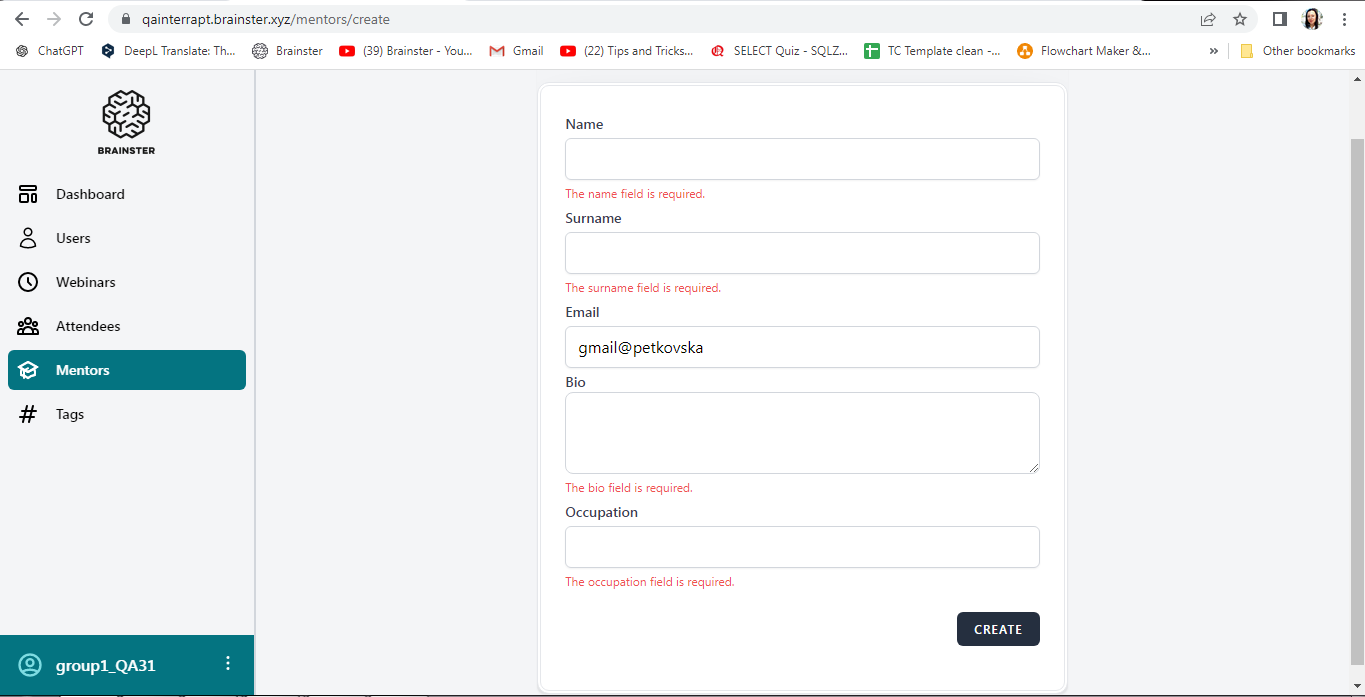
[Mentors] When attempting to create a mentor, the user experience an issue filling in the email field. A message indicating that the email must be a valid email address is not displayed. The field is successfully filled in with invalid format
Environment:
Google Chrome Version 125.0.6422.142 (Official Build) (64-bit)
Precondition:
User is logged in and navigated to https://qainterrapt.brainster.xyz/
Steps to reproduce:
1. Choose Mentors from the menu on the left side of the page
2. Click on Create button
3. Click on Email field
4. Fill in the Email field with invalid format
5. Click on Create button
Expected reslts:
After clicking the Create button the user should receive a message that the email field must be filled in with a valid email address
Actual result:
Upon clicking the Create button, the message stating that the email field must be filled in with a valid email address is not displayed. The field is successfully filled invalid format, allowing the user to continue filling in the form.
Files
No data to display