Bug #2689
openEnd date can be set before start date when editing webinar dates
0%
Description
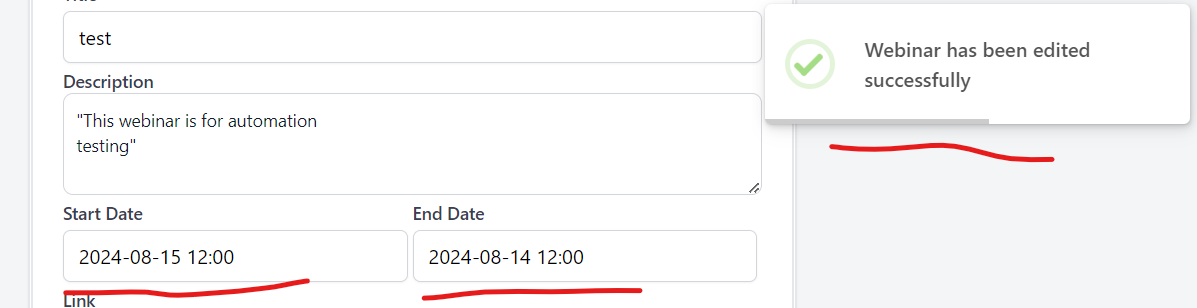
When user is editing webinar dates, end date can be set before start date
Steps to reproduce:
1. Log in in https://qainterrapt.brainster.xyz
2. Open Webinars page
3. Click on the edit button (in the form of a pencil symbol) on any Webinar
4. Click on Star date - date picker field
5. Choose today's date
6. Click on End date - date picker field
7. Choose yesterday's date
8. Click on Edit button to save changes
Expected Result: If an end date is selected before the start date, clicking "EDIT" should display an error message.
Actual result: The end date can be set before the start date, and when "EDIT" is clicked, the changes are saved, and a success message is shown: “Webinar has been edited successfully”
Environment:
https://qainterrapt.brainster.xyz/webinars
Version of OS – Version 127.0.6533.73 (Official Build) (64-bit)
Browser | Google Chrome
Files