Bug #2699
openEditing Webinar link allows saving an invalid URL
0%
Description
When the user changes the Link, change can be saved with an invalid URL
Steps to reproduce:
1. Log in in https://qainterrapt.brainster.xyz
2. Open Webinars page
3. Click on edit button (in the form of a pencil symbol) on any Webinar
4. Delete the input from Link
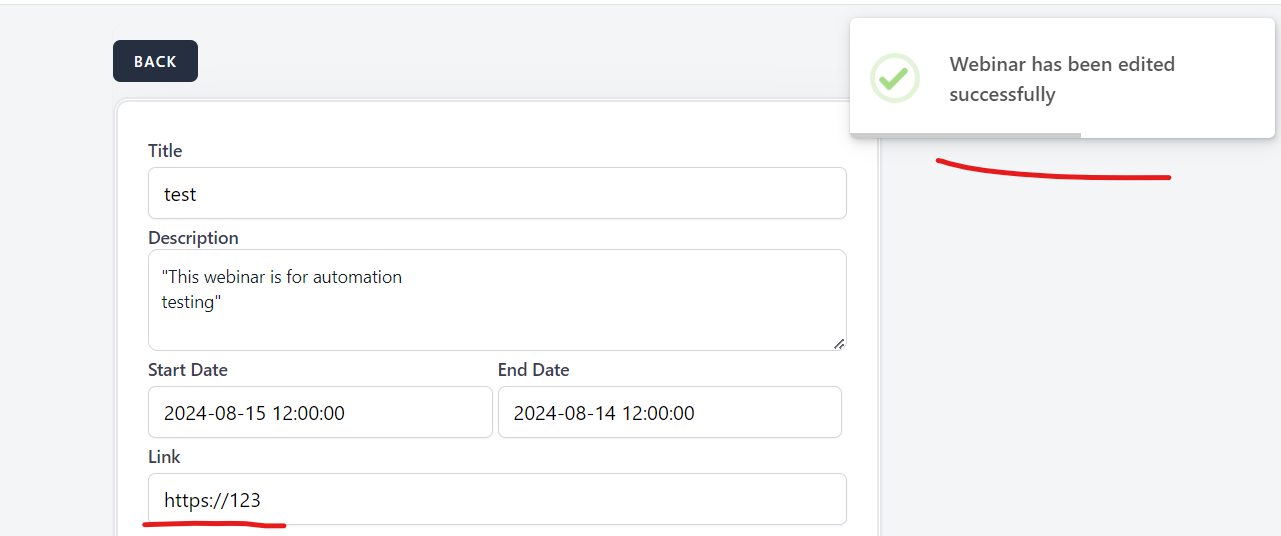
5. Enter "https://123"
6. Click on "Edit" button to save the change
7. Observe
Expected Result: The link should be a valid URL format and follow industry-standard protocols, such as "http://" or "https://". The link should point to the correct destination page or resource, and should not redirect to irrelevant pages. The link should be stable and not prone to breaking or expiring.
Actual result: Changes are saved even when an invalid URL is entered, and a success message is shown.
Environment:
https://qainterrapt.brainster.xyz/webinars
Version of OS – Version 127.0.6533.73 (Official Build) (64-bit)
Browser | Google Chrome
Files
No data to display