Bug #2730
open{Webinars}Description filed accepts input outside of characters limit
0%
Description
Enviroment https://qainterrapt.brainster.xyz/login
Broswer: Google Chrome
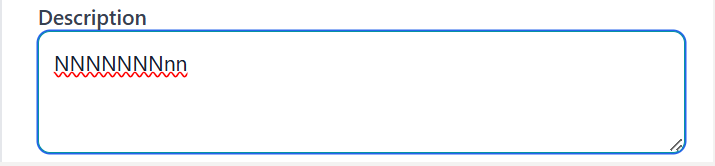
Description: Description field accepts input with 9 characters and 501 characters that are outside of the limit
Pre-conditions:/
Steps:
1.Log in to the system
2.Navigate to ""Webinars"" page
3.Click on Create button right up the corner
4.Click on Description filed
5.Enter a description
a.with 9 characters (e.g NNNNNNNnn)
b.with 501 charaters (e.g vghkZXvTwMzzaCLdjgoaoQdLLCQyZIbFnlyDMnCnoJaOCDtAPBIhFYPovyoTUjqUQSmGQuwSyDbPvusNnUJKNZHukhrcODRivNvIdAAOLExVkhvWVjPbcEqFihgTMHrhqQxLjQNkqdzzbTahexKrmmnZfipsVNqeoowlAbkihrhUTaWbHjgluwpRZezhxwPpQrniknETmtrNZMopankepowOPAKKMNgWorktEFGXPeenLcbfXfdcwmpCmOuGTIgEASUnmTIJfZskYFkfklBraKNPXRkUuVxRnHENcmmKAaRbXPRFqZuSpHPlazIIvAklWOrxyNMJXmMHxGHtaEBCMOQuQChAdepxKWEVQwWvJDrIOpUsKirxXFVmQBGkOFxPlNCUtpSgMlqMYLZCiFLMTgoCanCkDVCvxTrKVkDwuBqLhaVUWhbYsFJDLVmKEwebOisVqWbMMjsZGpraOAOFnHaTMMDfoPYoFPUauXjleAIdYhSuDCNQ)
6.Observe the description in Description field
Expected Result: An error message should prevent displaying description with 9 and 501 characters
Actual Result: The description field accept description with 9 and 501 characters without triggering any error message
Files
No data to display