Bug #2843
open[Attendees] User is able to edit an attendee by entering invalid data onto the "City" input field
0%
Description
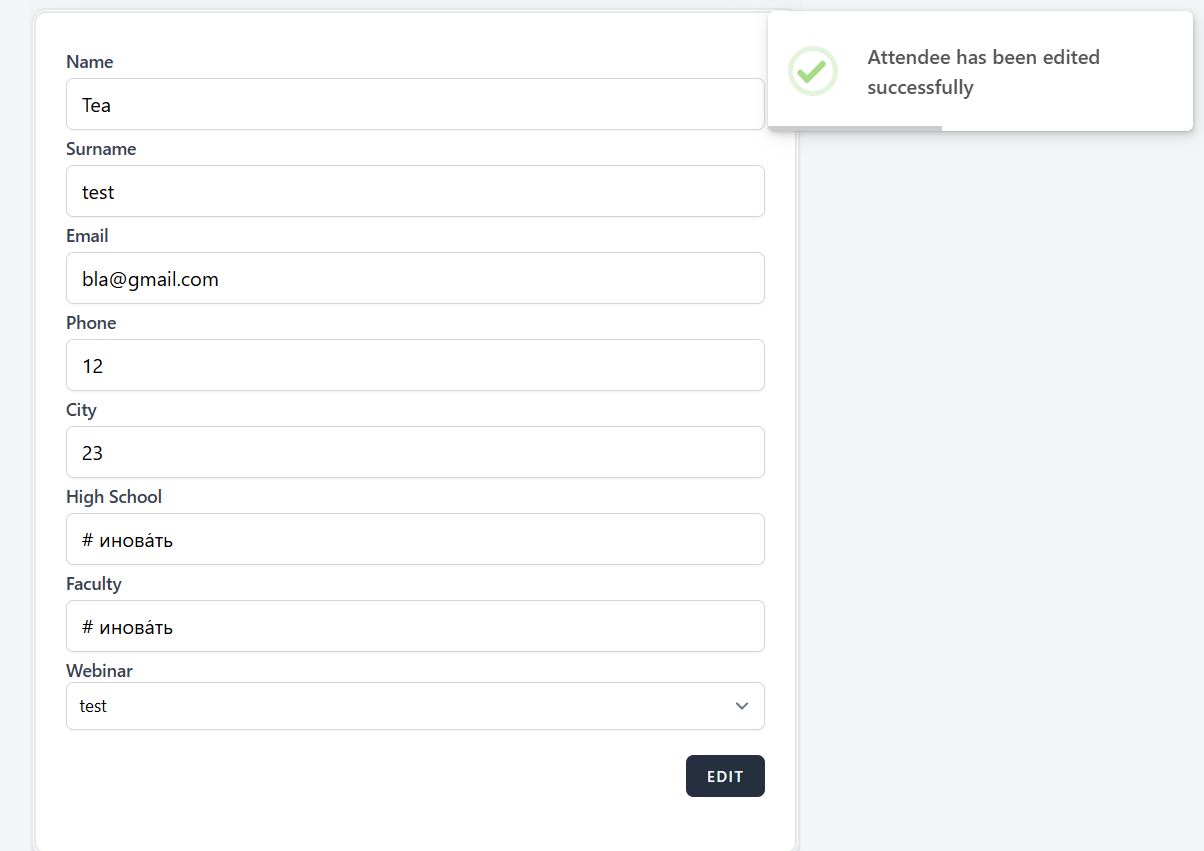
By clicking on the edit icon button next to every attendee, an edit page is opened. User can enter invalid data opposite to the user story(numbers instead of letters and special characters, length outside range 3-25 characters) in the "City" input field and by clicking on the edit button changes are saved with a validation message.
Environment
PC / Windows 10 Pro V. 22H2 /Google Chrome Version 131.0.6778.140 (Official Build) (64-bit)
https://qainterrapt.brainster.xyz/login
- Log in to the system
- Navigate to the "Attendees" page
- Select "Edit" icon button, next to the attendee
- Enter invalid data in the "City" input field(e.g. 23, CityCityCityCityCityCityCity)
- Click on the "Edit" button to save changes
- Observe the behavior of the page
Expected Result
The system should not allow an attendee to be edited with invalid data entered into the "City" input field.
Actual Result
The system allows an attendee to be edited with invalid data entered into the "City" input field. A validation message appears "Attendee has been edited successfully".
Files
No data to display