Improvement #2921
open[Mentors] Highlighting text inputs in Search field to avoid low visibility and to highlight action.
0%
Description
Description:
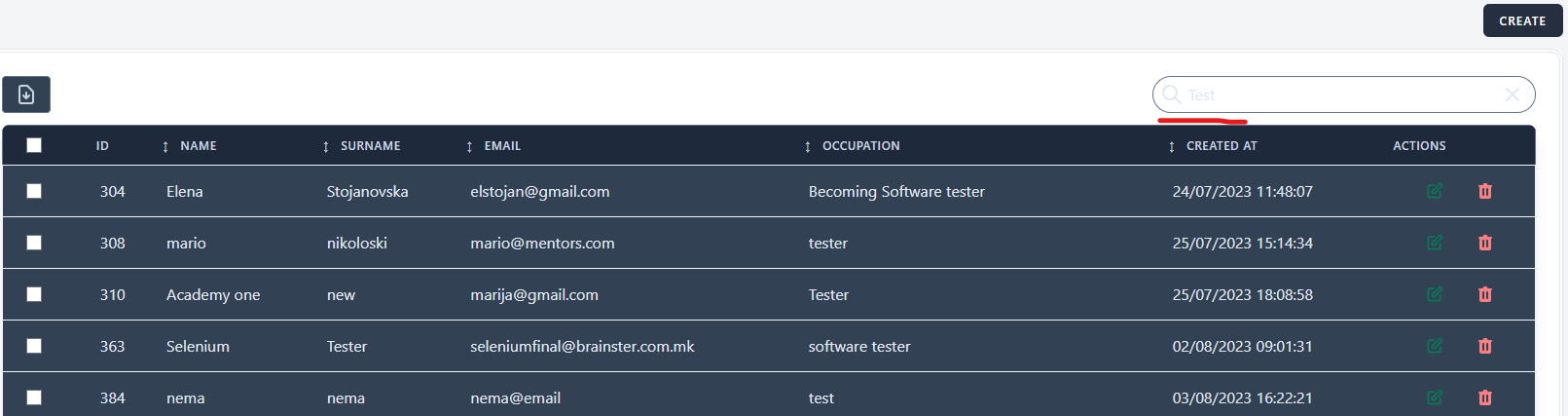
If text is inputted in Search field, letters are rendered light gray which makes them hardly distinguishable from the background and difficult to read. Applying primary or secondary color will render the user's action as more crucial, will make the field more user-friendly and easier to operate with, and it will also aid to the aesthetic balance of contrast.
Environment:
"https://qainterrapt.brainster.xyz
Browser: Chrome - Version 131.0.6778.140 (Official Build) (64-bit)
OS: Windows 11 Pro
Screen size: 1920x1080
Zoom level: 100%"
Steps to reproduce:
1. Navigate to Mentors main page URL.
2. Position over the Search module.
3. Input search data: "Test"
4. Observe.
Expected results:
The searched text in the Search module should be clearly visible and distinguishable as per design, with regards to the contrast theory of text and background. The user should utilize the Search field with ease and the text should have optimal readability.
Actual results:
By data entry in the Search module, text is hardly visible and distinguishable from the background. Text color is rendered light gray, which does not fulfil optimal readability for the user.
Files
No data to display