Bug #2996
openThe "Name" field in edit form accepts invalid special characters and less than 7 and more than 50 characters without any validation error.
0%
Description
Environment
https://qainterrapt.brainster.xyz/login
OS Name: Microsoft Windows 10 Pro
Browser: Google Chrome
Version 131.0.6778.139 (Official Build) (64-bit)
Browser Microsoft Edge
Version 131.0.2903.99 (Official build) (64-bit)
Huawei P smart 2021
Version: 10.1.1.270(C432E4R4P1)
Browser: Google Chrome
Description
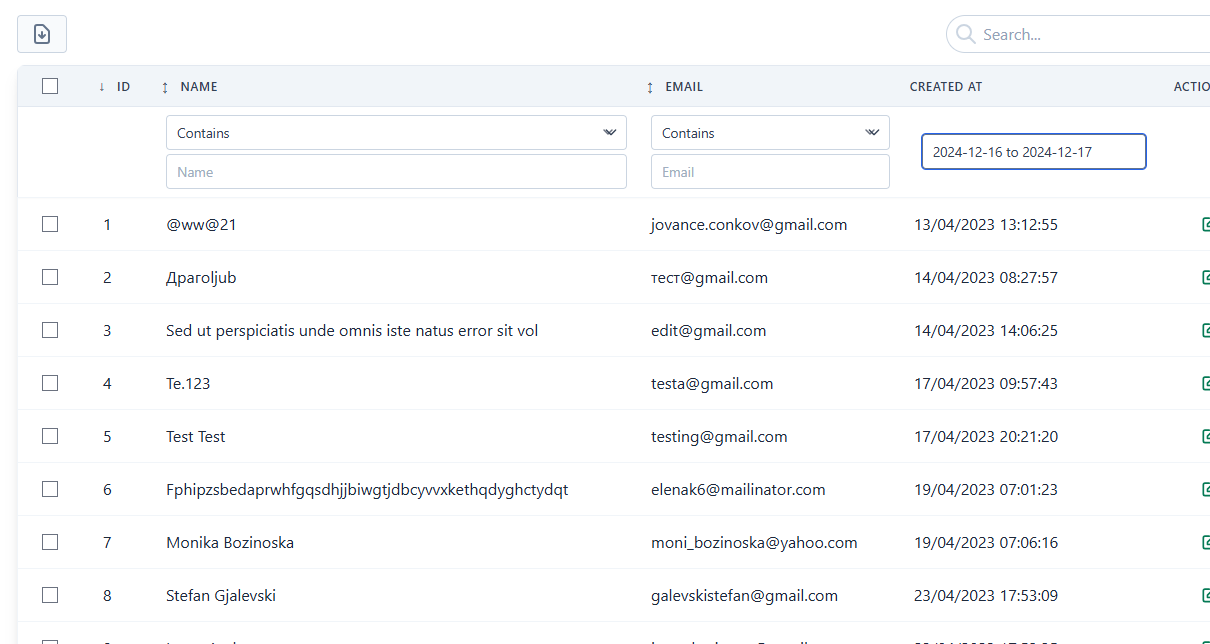
When the user selects a date in the "Select a period" field and submits the search, the application fails to filter and display records corresponding to the selected date. The page does not update or change, and all records remain visible instead of displaying only the relevant results.
Pre-conditions
User must be logged into the application and the application must have records with date-based data.
Steps to reproduce
1. Log in to the Interapt
2. Navigate to the Users page
3.Select a valid date from the ""Select a period"" field
5.Observe the results displayed on the page.
Expected Result
The page should display only the records that match the selected date.
Actual Result
The page content does not change, and all records are still displayed instead of filtering by the selected date.
Files
No data to display