Bug #3032
open[Attendee] The admin can register attendee with invalid email format
0%
Description
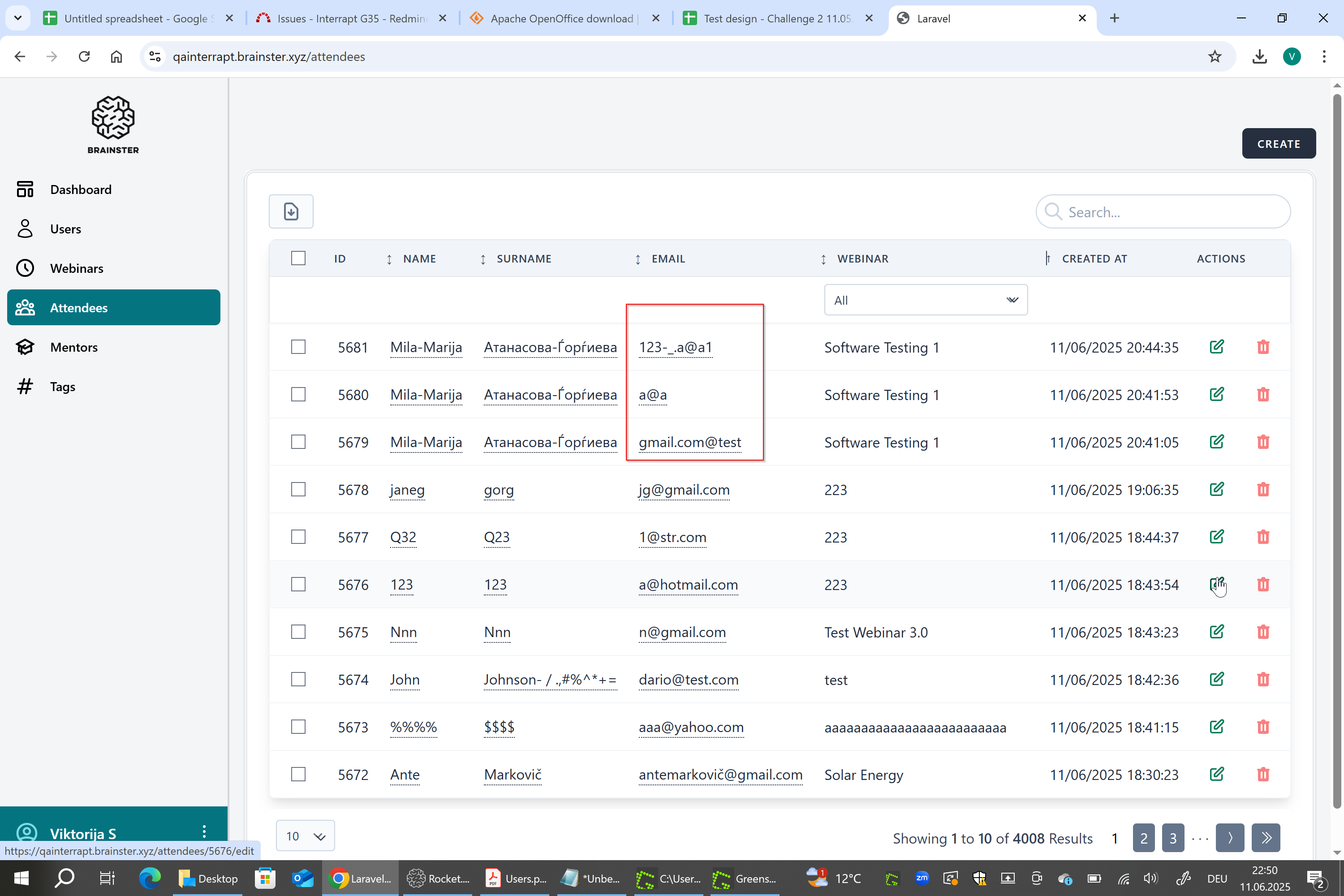
The system allows an administrator to register an attendee using an invalid email address such as a word with the special character @ (for example a@a). This email does not conform to standard email formatting rules. No validation is performed to check the correctness of the email format, which results in the system accepting and saving invalid data. This can lead to issues with email delivery, such as missed webinar invitations or confirmations.
Environment
OS Windows 10 Pro
Google Chrome Version 137.0.7151.56 (Offizieller Build) (64-Bit)
https://qainterrapt.brainster.xyz/attendees/create
Pre-conditions
User must be logged in as admin
- Navigate to the 'Attendees' page
- Fill in the 'Name' field with valid data
- Fill in the 'Surname' field with valid data
- Fill in the 'Email' field with invalid data (a@a, gmail.com@test, 123-_.@a1)
- Fill in the 'Phone' field with valid data
- Fill in the 'City' field with valid data
- Fill in the 'High School' field with valid data
- Fill in the 'Faculty' field with valid data
- Select a webinar from the 'Webinar' drop-down menu
- Click the 'CREATE' button
- Observe
Expected Result
The attendee should not be created, because email is not valid and an error message 'The Email field is required.' should be displayed in red letters.
A valid email address generally requires a local part (username), symbol @, and a domain name (including the top-level domain).
Local Part (username): This is the part before the symbol @. It can include lowercase letters (a-z), numbers (0-9), periods (.), underscores (_), and dashes (-). Consecutive periods or special characters are not allowed.
Symbol "@": This is the mandatory delimiter between the local part and the domain.
Domain Name: This is the part after the symbol and includes the domain and top-level domain (e.g., com, net, org). Letters, numbers, and dashes are generally allowed within the domain name.
An email address must have at least one character in the local part, followed by the @ symbol, and a domain name.
Actual Result
The system accepts the invalid email address format 'a@a' and completes the attendee registration successfully without triggering any validation error.
Files
| [email protected] (403 KB) [email protected] | |||
| [email protected] (397 KB) [email protected] | |||
| [email protected] (398 KB) [email protected] | |||
| 2025-06-09_Übersicht.png (443 KB) 2025-06-09_Übersicht.png |
![[email protected]](/attachments/download/1841/2025-06-09_123-_.a@a1.png)
![[email protected]](/attachments/download/1842/2025-06-09_a@a.png)
![[email protected]](/attachments/download/1843/2025-06-09_gmail.com@test.png)
Updated by Viktorija S about 1 year ago
- File deleted (
2025-06-05_Bug for register an atendee with invalid E-Mail_2.png)
Updated by Viktorija S about 1 year ago
- File deleted (
2025-06-07_Bug for register an atendee with invalid E-Mail_4.png)
Updated by Viktorija S about 1 year ago
- File deleted (
2025-06-07_Bug for register an atendee with invalid E-Mail_5.png)
Updated by Viktorija S about 1 year ago
- File [email protected] [email protected] added
- File [email protected] [email protected] added
- File [email protected] [email protected] added
- File 2025-06-09_Übersicht.png 2025-06-09_Übersicht.png added
- Description updated (diff)
Updated by Viktorija S about 1 year ago
- Subject changed from [Attendee] The admin can register attendee with invalid email format such as a@a to [Attendee] The admin can register attendee with invalid email format
- Description updated (diff)