Actions
Bug #3057
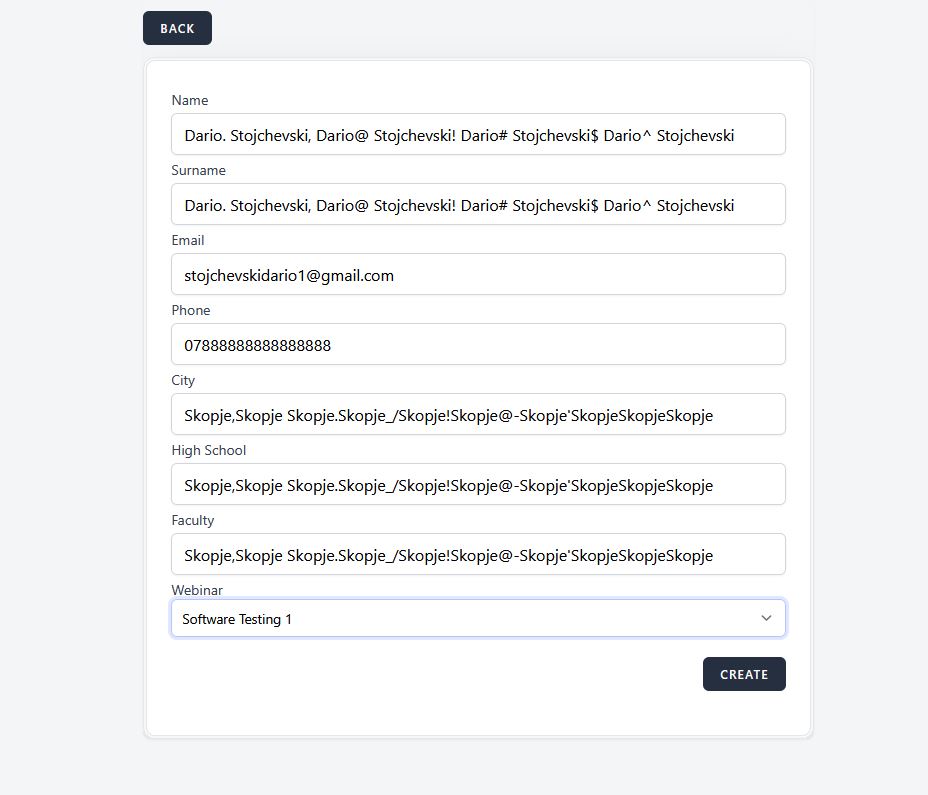
open1.35.4 [Attendees] User is able to create Attendee with more than allowed characters in input fields
Start date:
06/11/2025
Due date:
% Done:
0%
Estimated time:
Description
User can create an Attendee with more than allowed characters on all fields
(Name,Surname,City) maximum 25 characters,
(High School,Faculty)maximum 50 characters,
(Phone) maximum 15 characters
Environment
test
https://qainterrapt.brainster.xyz/login
Windows 10 PRO
Mozilla Firefox 139.0.4 (64-bit)
Severity
MAJOR
Steps to reproduce
1.Log in to the page
2.Navigate to the 'Attendees' page
3.Click on 'Create' Button
4.Fill in input fields with more characters than allowed
5.Save the Attendee by clicking the 'Create' Button
6.Check if Attendee is created
Expected Result
Attendee should not be created and a message should be displayed
Actual Result
The system allows an Attendee to be created and added to the list without displaying any message
Files
Updated by Dario S about 1 year ago
- Subject changed from 1.35.4 [Attendees] User is able to create Attendee with more than allowed characters in input field to 1.35.4 [Attendees] User is able to create Attendee with more than allowed characters in input fields
Actions