Bug #3073
openExporting just few attendees leads to 500 SERVER ERROR page
0%
Description
Title
Exporting a small number of attendees leads to a 500 SERVER ERROR
Description
When a user selects a small number of attendees (typically fewer than 5) and attempts to export them as an Excel file, the system returns a 500 Internal Server Error. This issue occurs consistently and prevents users from performing targeted exports, which may be critical for managing specific attendee groups. Exporting all attendees works as expected, indicating a potential logic or data handling issue when dealing with smaller subsets.
Environment
Iphone Pro 16
https://qainterrapt.brainster.xyz/attendees?page=400#
Steps to Reproduce
- Navigate to the Attendees section of the application.
- Select only a few attendees .
- Click on Export (Excel).
- Observe the result.
Expected Result
The selected attendees should be successfully exported without error.
Actual Result
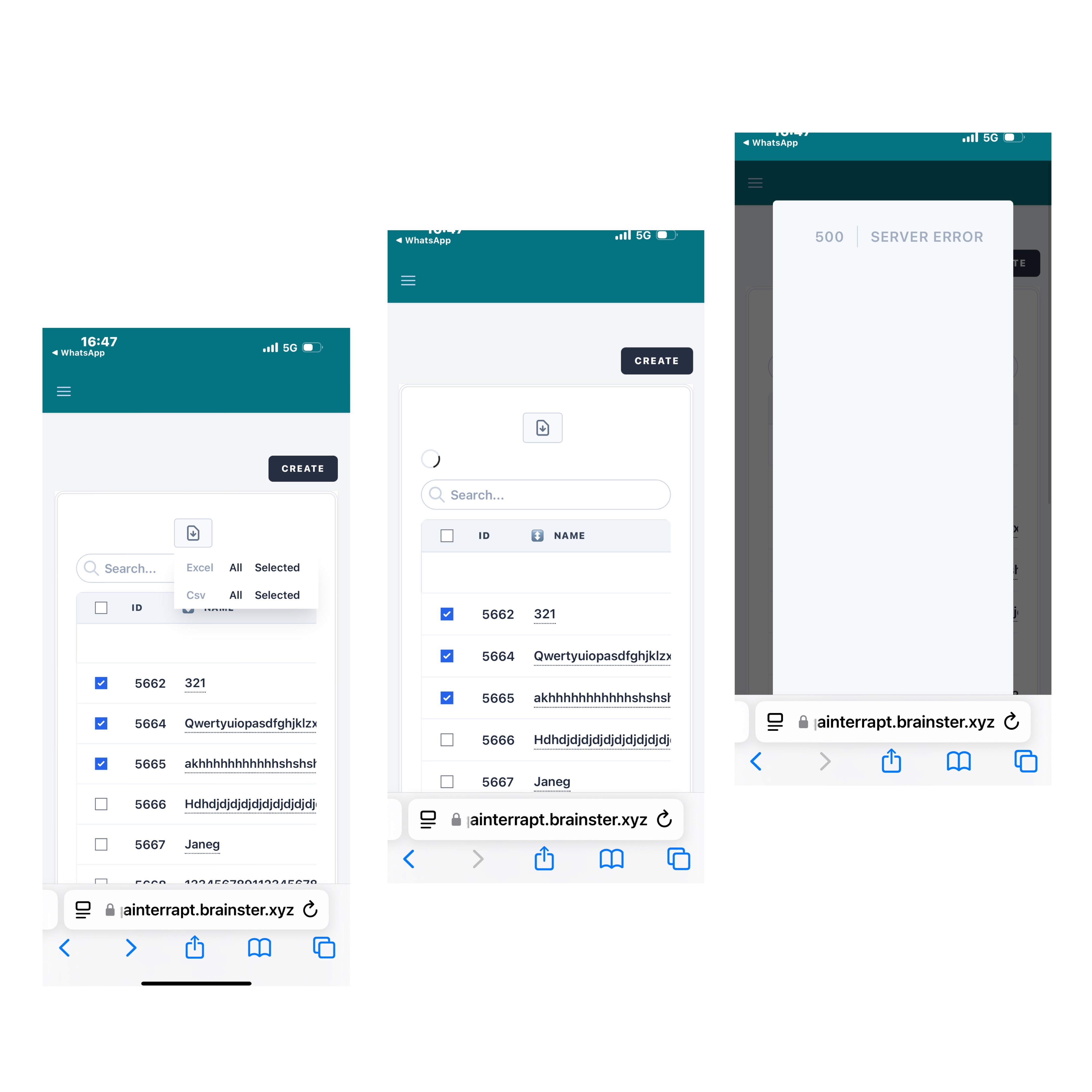
A 500 Internal Server Error page is displayed.
Severity
High – The error blocks a key feature (selective data export), which is expected to function for filtered or small datasets.
Priority
Medium – While the feature is important, a full export remains available as a workaround.
Files
Updated by Nermina K about 1 year ago
- File INT-01 Screenshot.JPG INT-01 Screenshot.JPG added
On Mobile view Exporting a small number of attendees leads to a 500 SERVER ERROR
Description
When a user selects a small number of attendees (typically fewer than 5) and attempts to export them as an Excel file, the system returns a 500 Internal Server Error. This issue occurs consistently and prevents users from performing targeted exports, which may be critical for managing specific attendee groups. Exporting all attendees works as expected, indicating a potential logic or data handling issue when dealing with smaller subsets.
Environment
iPhone Pro 16
https://qainterrapt.brainster.xyz/attendees?page=400#
Steps to reproduce
- Navigate to the Attendees section of the application.
- Select only a few attendees .
- Click on Export (Excel).
Observe the result.
Expected Result
The selected attendees should be successfully exported without error.
Actual result
When trying to select from three to five atendees and export it to an Excell sheet on mobile view, then 500 Internal Server Error page is displayed.
Severity
High – The error blocks a key feature (selective data export), which is expected to function for filtered or small datasets.
Priority
Medium – While the feature is important, a full export remains available as a workaround.