Actions
Improvement #3107
open[Webinar] When we navigate to the Action dialog (view,edit,delete) doesn’t visulaize the names of the actions.
Start date:
06/12/2025
Due date:
% Done:
0%
Estimated time:
Description
Description
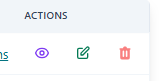
When we Login to the Interrupt page,and then navigate to the Webinars link, and navigate to the Action dialog (view,edit,delete) doesn’t visualize the names of the actions.It visualise only the icons ,which doesn’t give precise description if you don’t know the meaning of the icons.
Environment
Xiaomi Redmi Note 13 / Android V. 15 / Google Chrome Version 137.0.7159.69
https://qainterrapt.brainster.xyz/login
- Log in to the page https://qainterrapt.brainster.xyz/webinars
- Navigate to the Webinar page
- Navigate with the cursor to the Actions part
- Hover over the the three icons
Expected Result
When the user hover the cursor over the three icon actions ,it should visualize the action buttons as tooltips.
- Actual Result
With hovering the cursor over the three icon actions ,doesn't show the names of the actions.
Files
No data to display
Actions