Bug #525
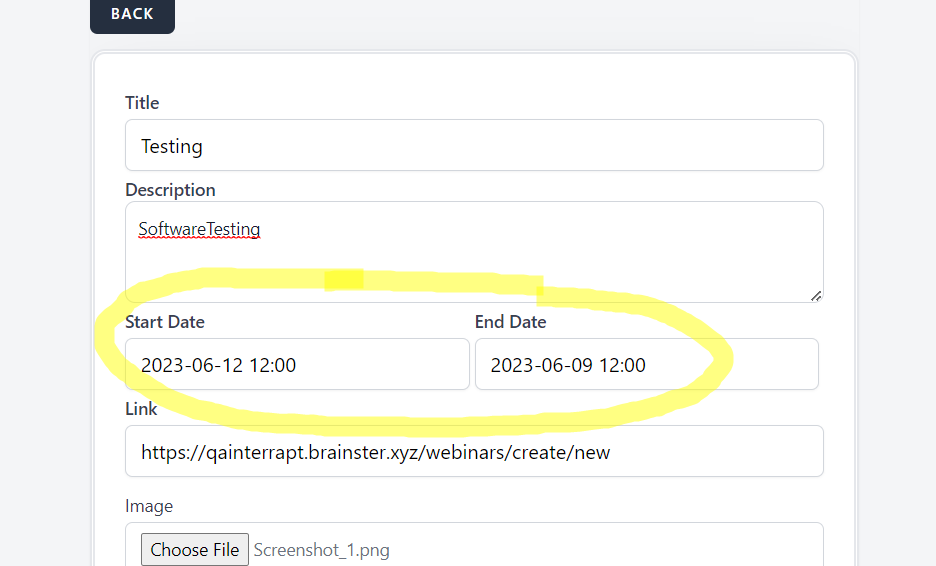
open[Webinar] The user is able to create a webinar when the end date is before the beginning date
0%
Description
/
Precondition
User must be registered as admin
Step To Reproduce
1.Navigate to browser
2.Enter https://qainterrapt.brainster.xyz/
3. Login with valid credentials
4. Navigate to Webinars
5. Click Create
6. In title field write " Testing"
7. In description field enter " SoftwareTesting"
8. For start date choose 2023-06-12 12:00
9. For End Date choose 2023-06-09- 12:00
10 In link field enter valid link
11. In image field choose a image with acceptable format
12. In mentor field select one mentor
13. In tag field select a tag
Expected Results
Error message should be displayed
Actual Results
New webinar is successfully created
Test Environment
Desktop device
Browser
Google chrome Version 114.0.5735.110 (Official Build) (64-bit)
url: https://brainster.tenant.kiwitcms.org/
Files