Actions
Bug #1512
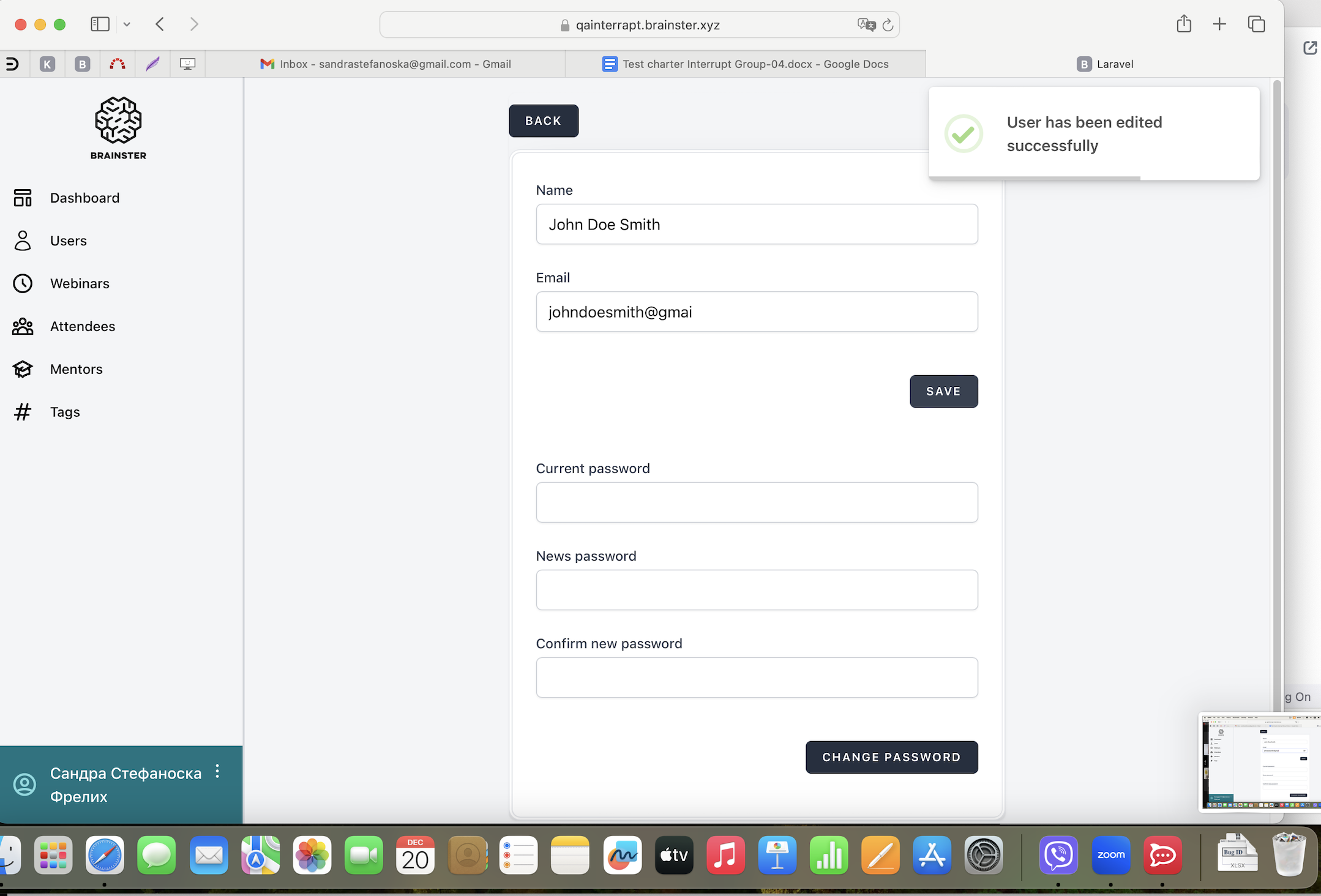
open[Users] User can edit their profile with invalid email
Start date:
12/18/2023
Due date:
% Done:
0%
Estimated time:
Description
Description:
While trying to edit their profile by clicking on user profile located in the lower left corner, the user is able to edit their profile with invalid email.
Environment:
Laptop, MacOS Sonoma Version 14.1.2, Safari Version 17.1.2, Desktop View / Apple iPhone 14 Pro, iOS Version 17.1.2, Safari Version 17, Mobile view
Preconditions:
User must be logged in.
- Click on user profile located in the lower left corner
- Edit the "Name" field with valid data (minimum 7 and maximum 50 characters in length, alphabetic characters (latin and cyrillic), all letter cases (lower and upper), special characters (only "-" and ".") and spaces)
- Edit the "Email" field with invalid data (not containing email prefix and not containing an email domain)
- Fill the "Current password" field with valid data (existing password)
- Fill in the "New password" with new valid data (8-30 characters, combination of numbers, alphabetic characters (latin and cyrillic) and special characters)
- Fill in the "Confirm new password" with the same data as in "New Password" field
- Click on "SAVE/CHANGE PASSWORD" button
Expected result:
The user should not be able to edit their profile with invalid email, message should appear that that the email field is required with red letters and changes should not be saved.
Actual result:
The user is able to edit their profile with invalid email and changes are saved.
Files
Updated by Sandra Stefanoska Frelih over 2 years ago
- Description updated (diff)
- Assignee set to Sandra Stefanoska Frelih
Updated by Sandra Stefanoska Frelih over 2 years ago
- File Screenshot_1512.png Screenshot_1512.png added
- Description updated (diff)
Actions