Bug #1597
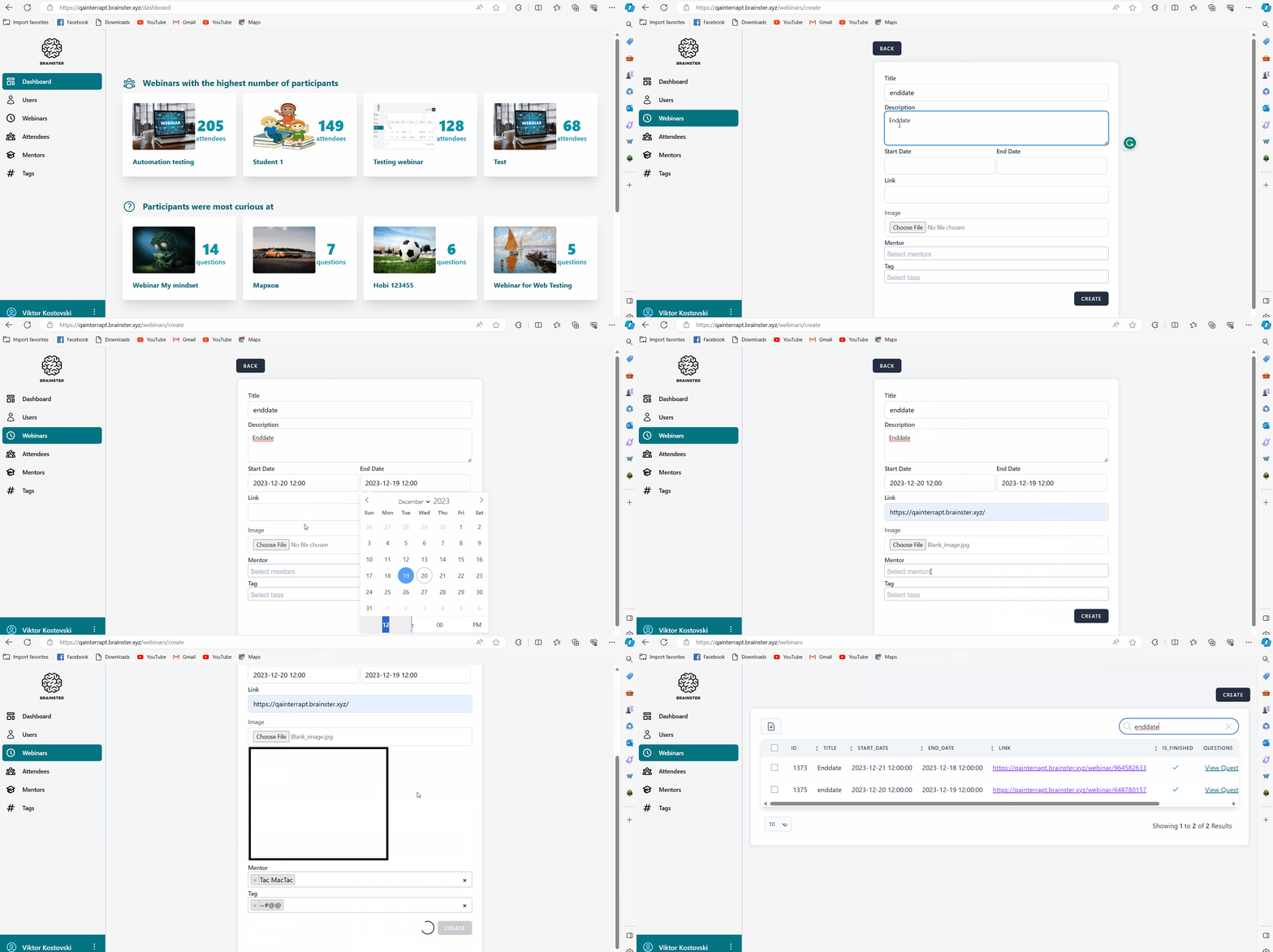
open[Webinars] The user can choose an end date before the start date when creating a webinar.
0%
Description
When creating a webinar, the user can choose an end date that occurs before the start date, and create the webinar with an invalid date.
Precondition
The user must be logged in
Steps to reproduce:
1.Navigate to the 'Webinars' menu.
2. Click on the 'Create' button in the top right corner.
3.Populate the 'Title' and the 'Description' fields with valid data.
4.Choose a 'Start Date'.
5.Choose an 'End Date' to be before the 'Start Date' .
6.Populate the 'Link' field with valid data and add an image in the 'Image' field.
7.Add a Mentor in the 'Mentor' field and the Tag in the 'Tag' field.
8.Press on the 'Create' button in the bottom right corner.
9.Press on the 'Back' button in the top left corner.
10.Search for the webinar and check if was created.
Expected result
The user should not be able to create a webinar with the 'End date' to be before the 'Start Date'.
Actual result
The user is able to create a webinar with the 'End date' to be before the 'Start Date'.
Files