Bug #1629
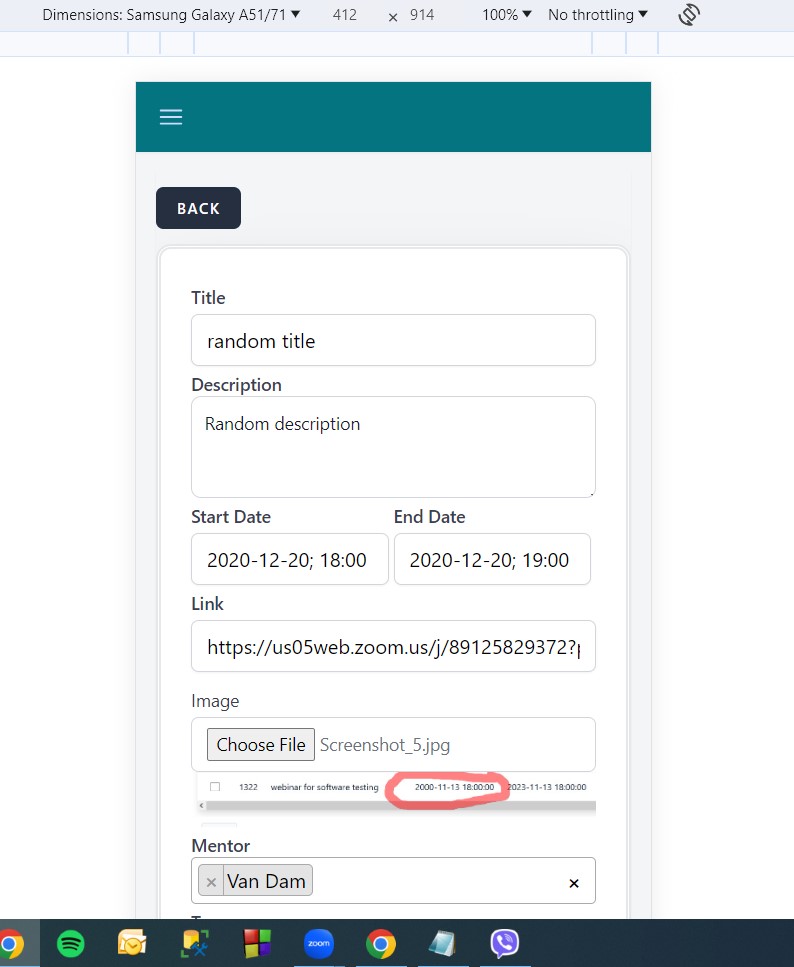
open[Webinars] Design of the "Create webinar" page is not responsive on mobile device
0%
Description
- Environment **
https://qainterrapt.brainster.xyz/login
Google Chrome Version 120.0.6099.110 (Official Build) (64-bit) Inspect tool
Dimensions: Samsung Galaxy A51/71; 412 x 914; Zoom: 100%;
No throttling; Portrait
- Description **
User is not able to create a webinar due to unresponsive design for mobile device
- Preconditions **
User is registered and logged in.
- Steps to reproduce **
1.Navigate to Webinars via dropright variation menu in the top left corner.
2.Click on the "CREATE" button in the top right corner.
3.Click on the "Title" field and enter valid title.
4.Click on the "Description" field and enter valid description.
5.Click on the "Start Date" calendar time picker and select valid start date format.
6.Click on the "End Date" calendar time picker and select valid end date format.
7.Click on the "LINK" field and enter valid link.
8.Upload an image successfully.
9.Select a mentor from the dropdown menu in "Mentor" field.
10.Select a tag from the dropdown menu in the "Tag" field.
11.Click on the "Create" button.
- Expected results **
The webinar should be created successfully
- Actual results **
The "Create webinars" page is not responsive on mobile device, elements are not properly arranged, no start and end date calendar time picker and the bottom of the page is not visible
Files