Actions
Bug #1651
openUser can be created with invalid Password format
Start date:
12/20/2023
Due date:
% Done:
0%
Estimated time:
Description
Precondition
Navigate and login to: https://qainterrapt.brainster.xyz/login
- Click on the ""Users"" via navigation menu
- Click on the ""CREATE"" button from the top right corner
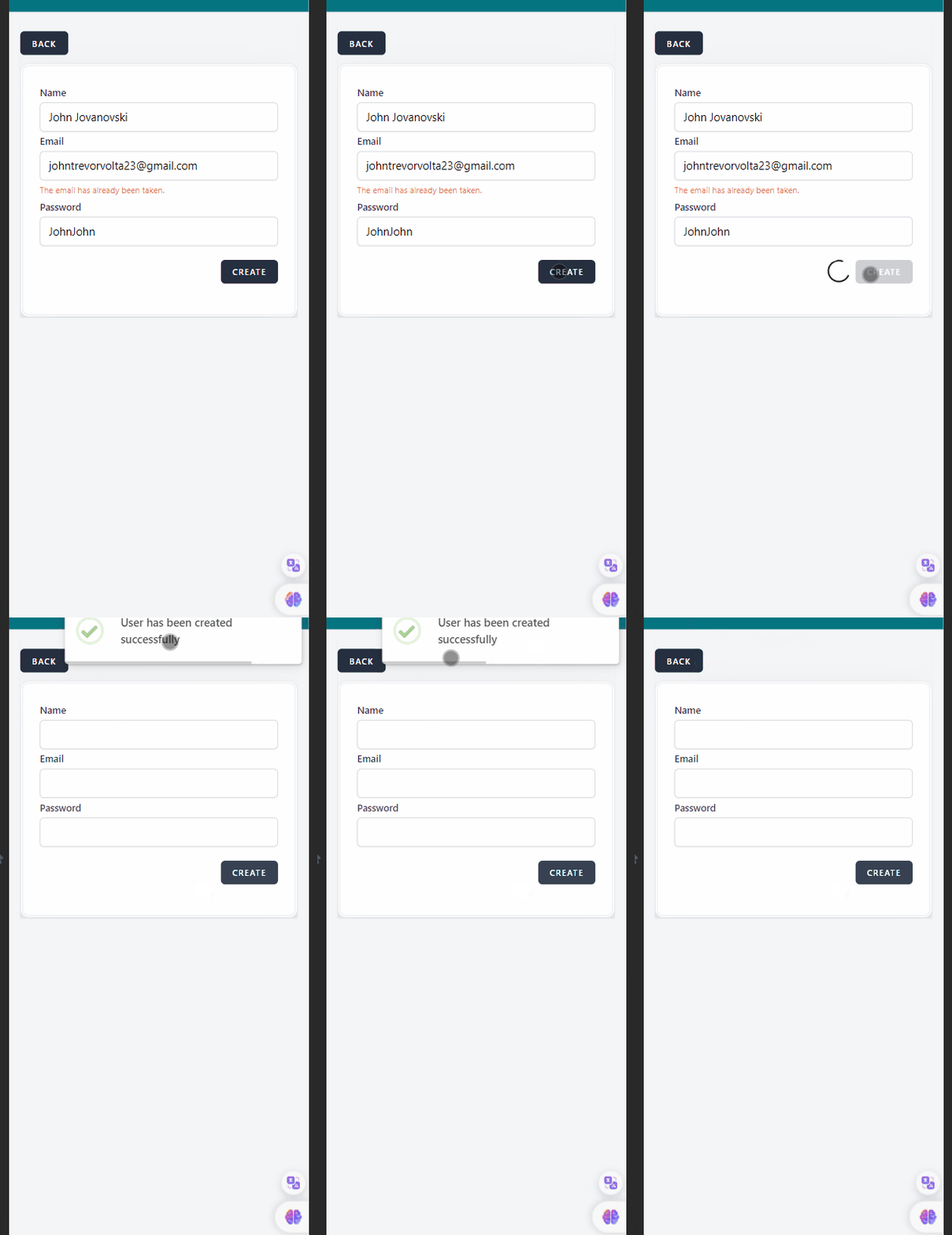
- Fill in the ""Name"" field with valid data (John Jovanovski)
- Fill in the ""Email"" field with valid data ([email protected])
- Fill in the ""Password"" field with data is invalid (JohnJohn)
- Click on the ""CREATE"" button
- Confirm that the user is not created
- Click the ""Back"" button to exit form"
Environment:
PC / Windows 10 Pro / Google Chrome Version 91.0.4280.88 (Official Build) (64-bit)
Mobile Phone / iPhone 14 / iOS 17.2.1
Expected results:
User should not be created unless the password is 8 characters long (or more) and includes special characters.
Actual result:
User is created and appears on the grid
Files
Actions