Actions
Bug #1665
open[Dashboard] 'BACK' button does not redirect the user to 'Dashboard' menu
Start date:
12/20/2023
Due date:
% Done:
0%
Estimated time:
Description
Description:
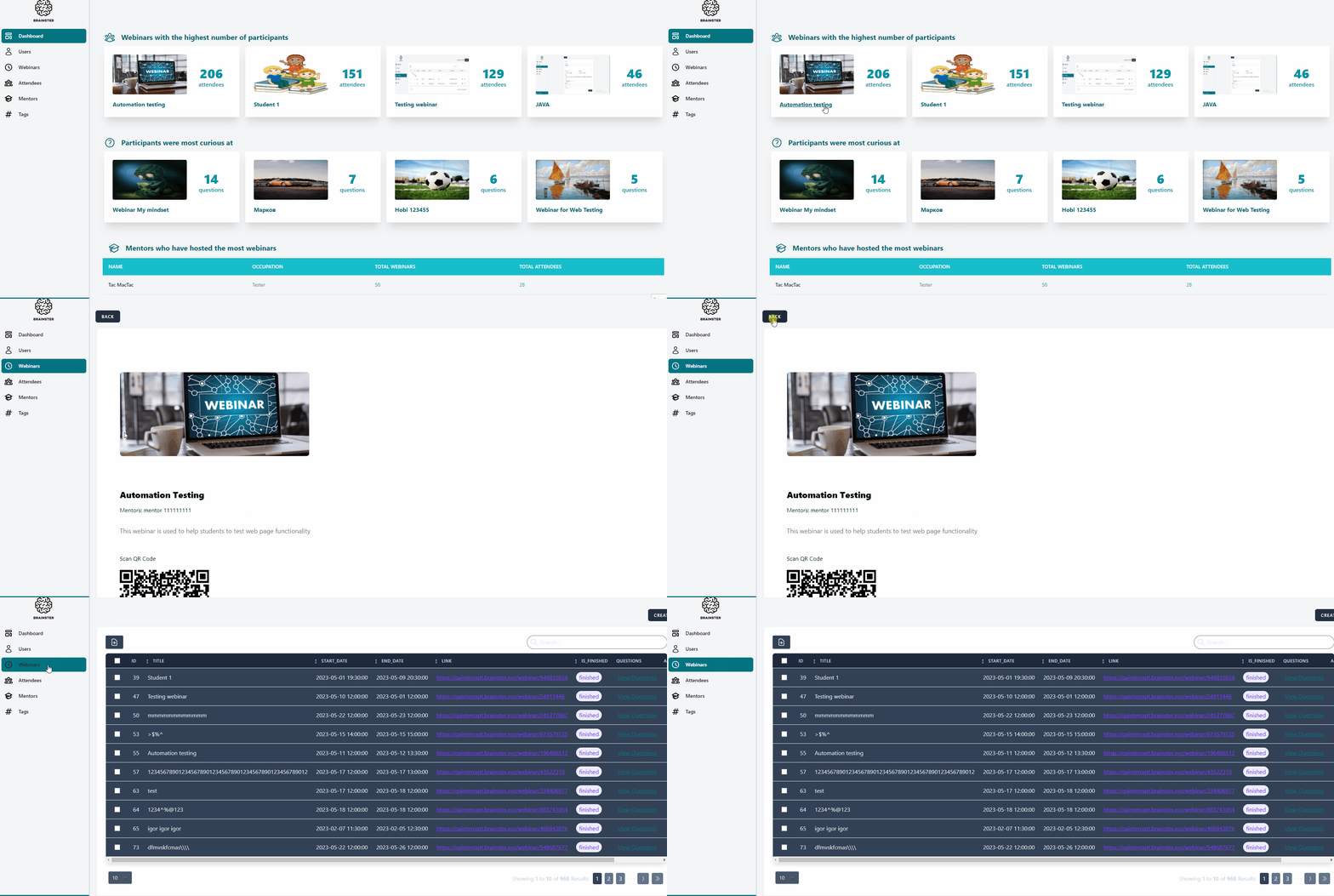
After opening a Webinar from Dashboard, the user is not redirected to the 'Dashboard' menu by clicking on the 'BACK' button.
Environment:
PC / Windows 11 Education V. 22H2 Google Chrome Version 87.0.4280.88 (Official Build) (64-bit)
Mobile / Samsung Galaxy S8+ 360x740
Precondition:
User must be navigated to: https://qainterrapt.brainster.xyz/login and logged in.
Steps to reproduce:
1.Click on one webinar displayed on 'Dashboard' menu.
2.Click the 'BACK' button on the top left corner.
Expected Result:
After clicking on 'BACK' button, the user should be redirected to 'Dashboard' menu.
Actual Result:
After clicking on 'BACK' button, the user is not redirected to 'Dashboard' menu, but is redirected to 'Webinars' menu.
Files
Actions