Actions
Bug #1671
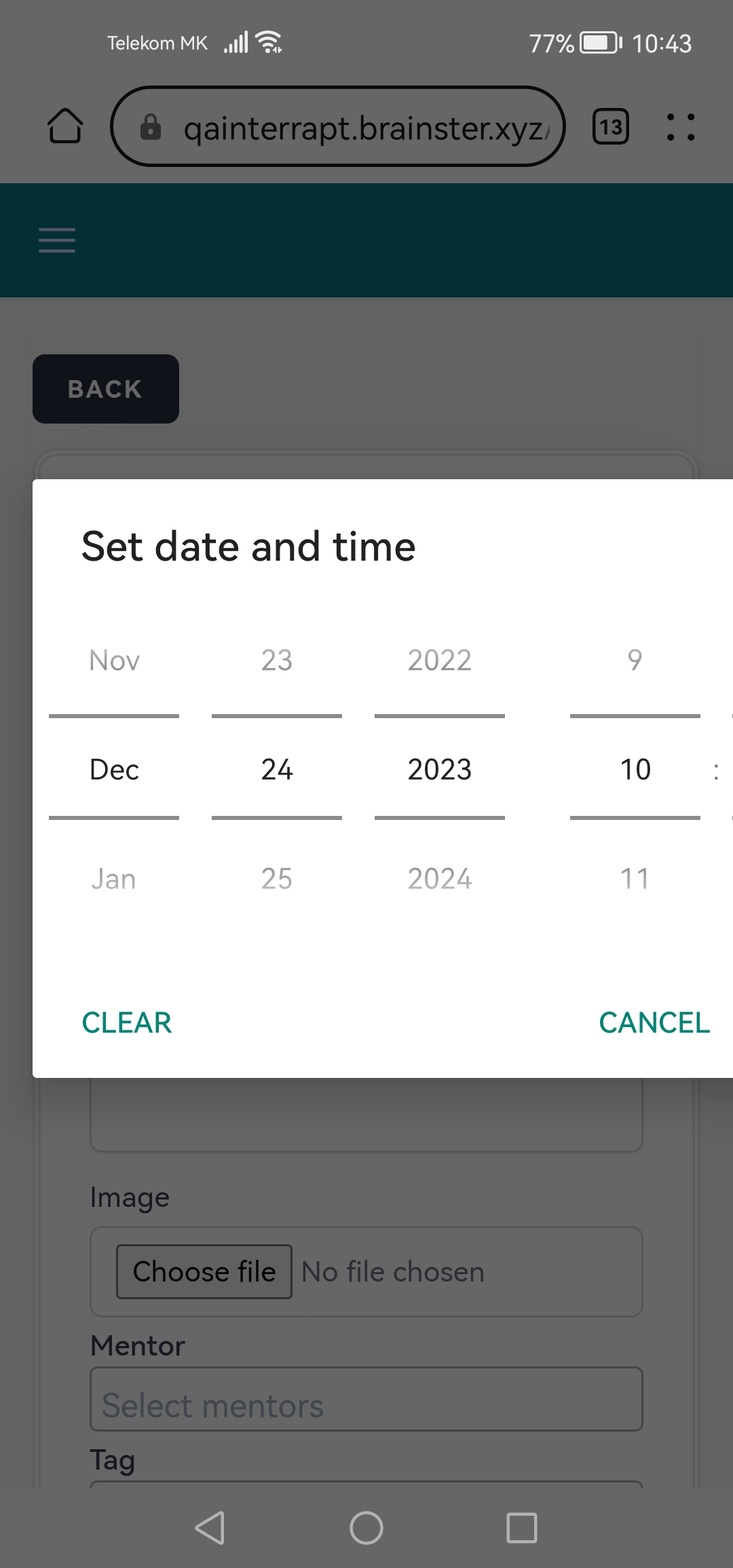
open[Mobile] [Webinars] No option to save a Start and End Date when creating a new Webinar.
Start date:
12/20/2023
Due date:
% Done:
0%
Estimated time:
Description
When clicking on Start Date and End Date the user only has a “Clear” and “Cancel” option and is unable to save a date for a given webinar.
Preconditions:
The user must be navigated to https://qainterrapt.brainster.xyz/ and logged in.
Environment:
https://qainterrapt.brainster.xyz
Huawei Browser Version 14.0.2.311
Huawei P40 Lite
Steps to reproduce:
1. Click on the "Webinars" menu
2. Click on the “CREATE” button
3. Select the “Start Date” field
4. Select date and time (Screenshot and video attached)
Test data:
4. December 24, 2023 ; 10am
Expected results:
The user should be able to choose and create the chosen date and time for the webinar.
Actual results:
The user is unable to save the date and time for the webinar.
Files
Actions