Actions
Improvement #1672
open[Webinars] Record and add webinars.
Start date:
12/20/2023
Due date:
% Done:
0%
Estimated time:
Description
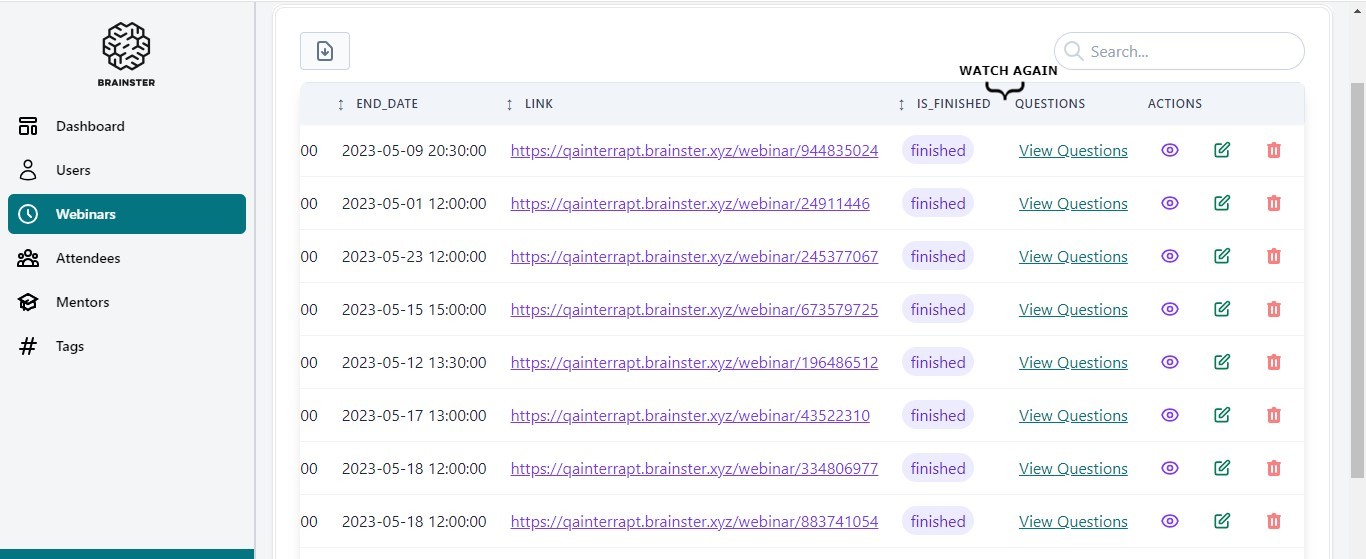
When there is an ongoing webinar, the admin should record and upload the finished webinar to the website in order for users to be able to watch it again and revisit something they may have missed or misunderstood during the webinar.
Preconditions:
The user must be navigated to https://qainterrapt.brainster.xyz/ and logged in.
Environment:
https://qainterrapt.brainster.xyz
Google Chrome, Version 120.0.6099.110 (Official Build) (64-bit)
Windows 10 Pro
Steps:
1. Click on the "Webinars" menu
2. Choose a webinar
3. Click on “WATCH AGAIN” (Image attached)
Expected results:
The finished webinar should be recorded and saved and a user should be able to watch it again.
Files
Actions