Bug #1689
open[Webinars]User is able to create new Webinar with invalid data in Title field
0%
Description
Preconditions
User must be logged in
Environment
https://qainterrapt.brainster.xyz/login /Windows 10 Pro 22H2/Google Chrome Version 119.0.6045.200 (Official Build) (64-bit)
Steps to reproduce
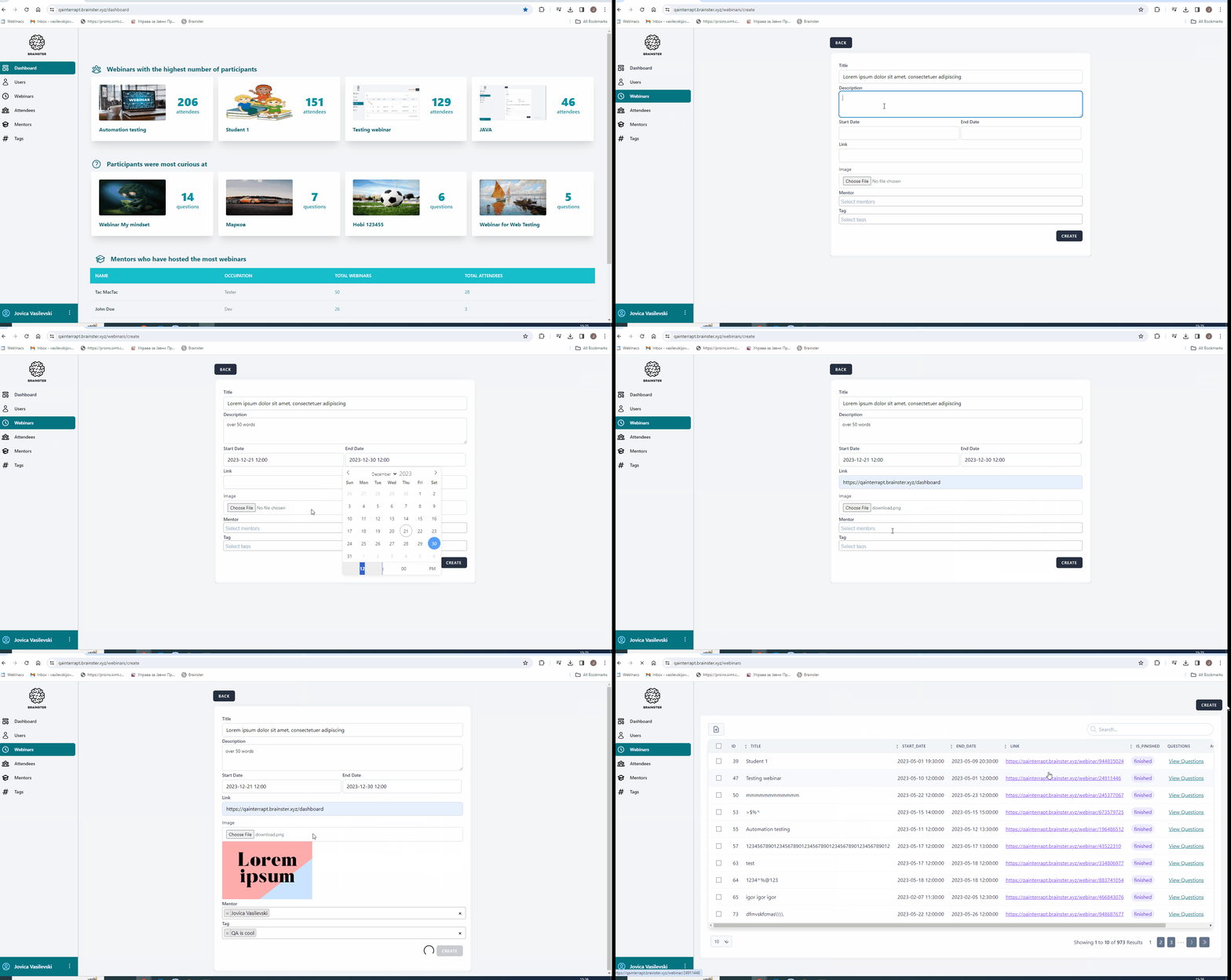
1. Click on the Webinars menu
2. Click on the Create button
3. Fill in the Title field with invalid data ( 51 characters in Title.gif);(less than 5 characters data.gif)
The title field should accept: Alphabetic characters (both, Latin and Cyrillic), all letter cases
(lower and upper), special characters (only “-”, and “.”) and spaces. It should be minimum 5 and
maximum 50 characters in length.
5.Fill in all other fields with valid data
5.Click on the CREATE button
6. Observe
Test data
3. [test]
3b.[software*testing]
3c.[Lorem ipsum dolor sit amet, consectetuer adipiscing]
Expected result
User should not be able to Create a webinar and message should be shown that the title field is required with red
letters.
Actual result
User is able to create a webinar with invalid data in title field
Files