Bug #1700
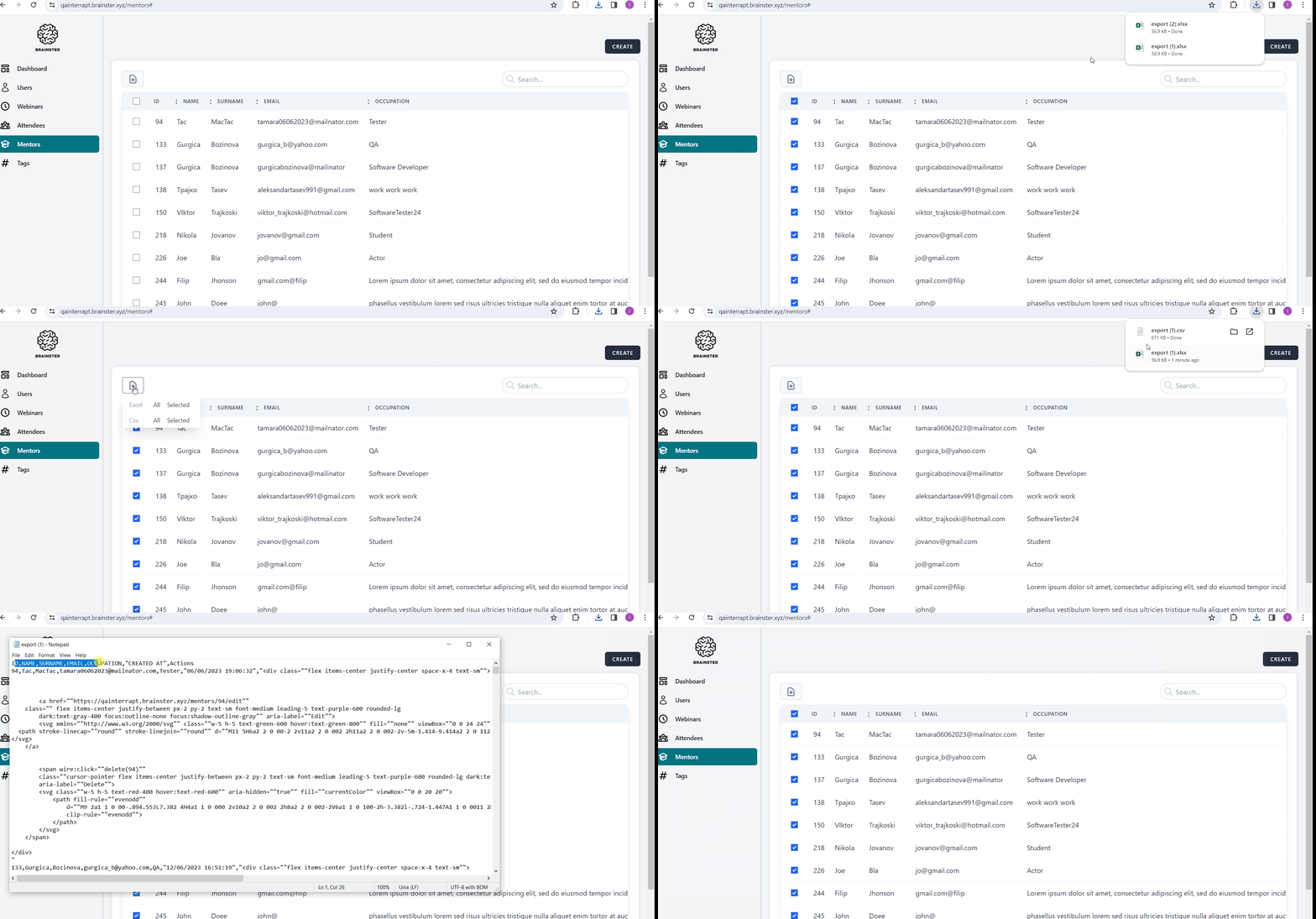
open[Mentor] When exporting Mentors information in Excel or in CSV file, additional information is contained in the exported documents.
0%
Description
Description:
By exporting the information for the Mentors in Excel or CSV file, the information available for the mentors should be: ID, Name, Surname, Email,
Occupation, Created At, but additional ''Action'' column with information is contained in the exported files.
Environment:
Mobile/Samsung Galaxy A70
PC/Windows 10 Home/Google Chrome Version 120.0.6099.111 (Official Build) (64-bit)
Precondition:
Тhe user must be logged in to https://qainterrapt.brainster.xyz/login
There must be at least one created mentor.
- Navigate to https://qainterrapt.brainster.xyz/mentors#
- Select all Mentors
- Click on the "Export Mentors" button
- Select the "All" option for Excel format
- Check if the Excel has been downloaded
- Select the "All" option for CSV format
- Check if the CSV file has been downloaded
Expected result:
Exported file should contain all information available for the mentors: ID, Name, Surname, Email,
Occupation, Created At.
Actual result:
An ''Action'' column is included in the exported documents apart from: ID, Name, Surname, Email,
Occupation, Created At.
Files