Bug #2480
open[Users] The "Password" field should not accepts more than 30 characters
0%
Description
Environment
Microsoft Edge: Version 125.0.2535.85 (Official build) (64-bit)
Mob Web: Application Version: Chrome 125.0.6422.165
Operating System: Android 10; JSN-L21 Build/HonorJSN-L21
https://qainterrapt.brainster.xyz/
Steps to reproduce
1. Navigate to the log in form page
2. Log in with valid credentials
3. Navigate to the Users page from dashboard
4. Clik on 'Create' button
5. Fill the 'Name' field with valid data
6. Fill the 'Email' field with valid data
7. Click on the Password field
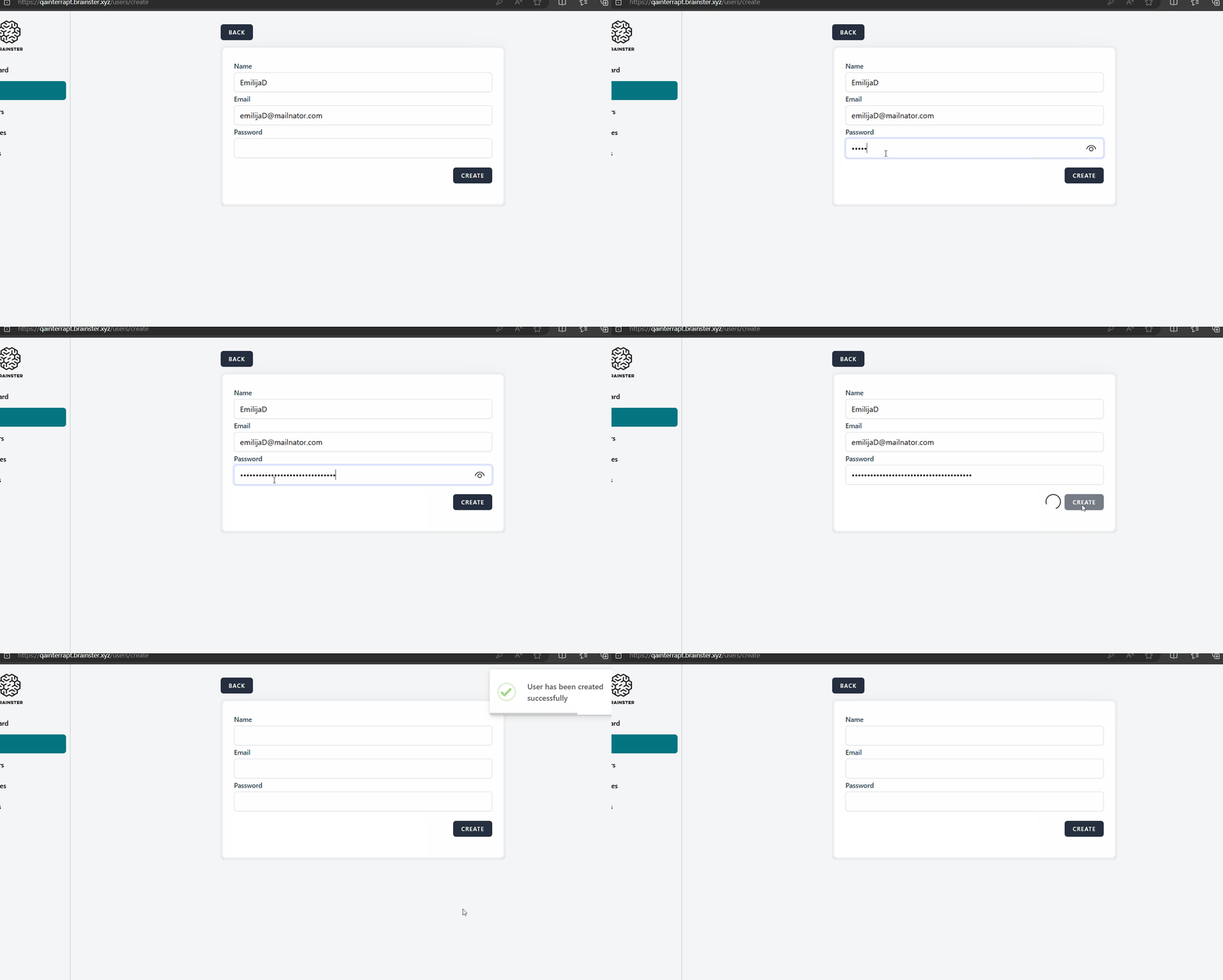
8. Fill the password field with more than 30 characters.
9. Click on 'Create' button
Expected Result
After the user has filled in the 'Password' filed with more than 30 characters the new user should not be created, a validation message should pop up in red letters that the password field is required
Actual result
After the 'Password' filed is filled with more than 30 characters, the new user is successfully created even though the specification lists maximum 30 characters
Files