Bug #2552
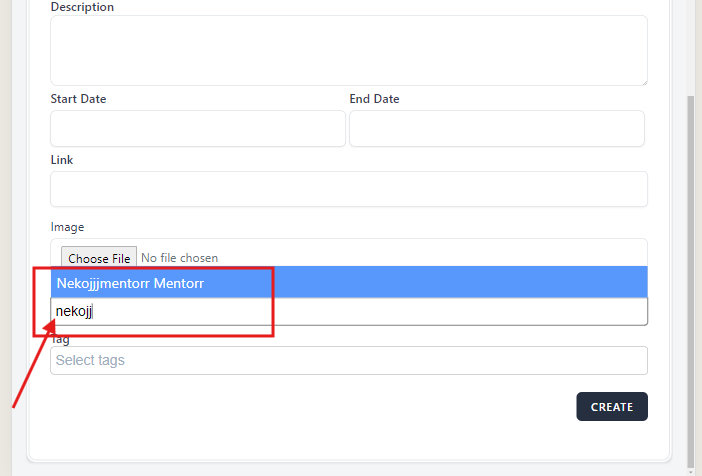
open[Webinars] The user should not be able to type in the 'Mentor' field
0%
Description
Environment
Platform/OS: Google Chrome
Version: 125.0.6422.142 (Official Build) (64-bit)
Device: iPad Pro
Dimensions: 1366x1024
URL: https://qainterrapt.brainster.xyz/webinars
Description
The user should not be able to type in the 'Mentor' drop-down field. The user should be able to select a mentor by clicking on the 'Mentor' drop-down field
Precondition
The user must be preregistered
Steps to reproduce
1. Navigate to https://qainterrapt.brainster.xyz/login
2. Log in with valid credentials
3. Click on the 'Hamburger' menu in the upper left corner of the page
4. Click on 'Webinars' in the sidebar menu
5. Click on the 'CREATE' button on the upper right corner of the page
6. Click on the 'Mentor' drop-down field
7. Type name of the mentor from the list
8. Click on 'Tag' field
Expected Result
The user should not be able to type in the 'Mentor' field. An error message should be displayed the mentor field is required in red letters.
Actual Result
The user is able to select mentor by typing in the 'Mentor' field.
Files