Bug #2599
open
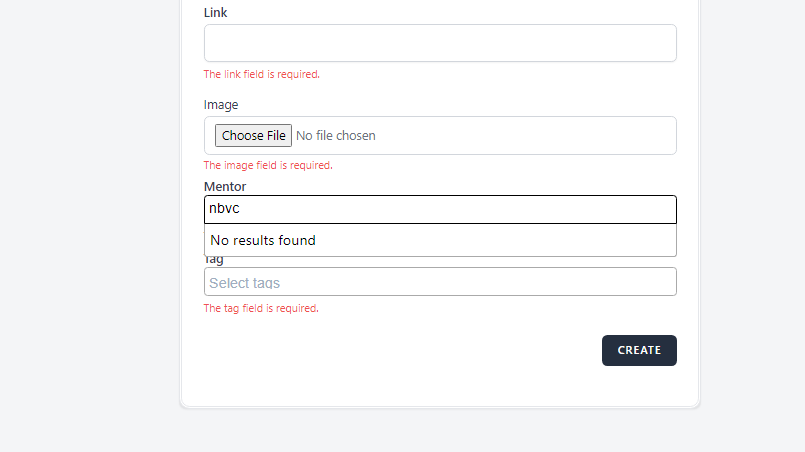
The 'Mentor' field does not accept only choosing the mentors
Added by Ema Dimitrovska about 2 years ago.
Updated about 2 years ago.
Description
When attempting to the Webinars page to create a new Webinar, the 'Mentors' field does not accept only choosing the mentors from the drop-down list but it can be written any name
Environment
-Google Chrome Version 125.0.6422.114 (Official Build) (64-bit)
Steps to reproduce
1. Open the https://qainterrapt.brainster.xyz/webinars
2. Fill in the required details to log in first.
3. Click on the 'Login' button
4. Choose the Webinars located on the right side, (third in a row).
5. Click on the 'Create' button located on the right upper corner
6. Try to enter the "Mentor" only choose a Mentor, and then try to write any name.
7. Click on the 'create' button positioned on the down-right corner
Expected Result
After clicking the "Create" button the error message should be automatically displayed.
Actual Result
Upon clicking the "Mentor" field, it can be written any name.
Files
Ema Dimitrovska wrote:
When attempting to the Webinars page to create a new Webinar, the 'Mentors' field does not accept only choosing the mentors from the drop-down list but it can be written any name
Environment
-Google Chrome Version 125.0.6422.114 (Official Build) (64-bit)
Steps to reproduce
1. Open the https://qainterrapt.brainster.xyz/webinars
2. Fill in the required details to log in first.
3. Click on the 'Login' button
4. Choose the Webinars located on the right side, (third in a row).
5. Click on the 'Create' button located on the right upper corner
6. Try to enter the "Mentor" only choose a Mentor, and then try to write any name.
7. Click on the 'create' button positioned on the down-right corner
Expected Result
After clicking the "Create" button the error message should be automatically displayed.
Actual Result
Upon clicking the "Mentor" field, it can be written any name.
Ema Dimitrovska wrote in #note-1:
Ema Dimitrovska wrote:
When attempting to the Webinars page to create a new Webinar, the 'Mentors' field does not accept only choosing the mentors from the drop-down list but it can be written any name
Environment
-Google Chrome Version 125.0.6422.114 (Official Build) (64-bit)
Steps to reproduce
1. Open the https://qainterrapt.brainster.xyz/webinars
2. Fill in the required details to log in first.
3. Click on the 'Login' button
4. Choose the Webinars located on the right side, (third in a row).
5. Click on the 'Create' button located in the right upper corner
6. Locate to the "Mentor" field choose a Mentor, and then try to write any name.
7. Click on the 'create' button positioned on the down-right corner
Expected Result
After clicking the "Create" button the error message should be automatically displayed.
Actual Result
Upon clicking the "Mentor" field, it can be written any name.
Also available in: Atom
PDF