Bug #2673
openWebinar description can be edited with invalid input lenght
0%
Description
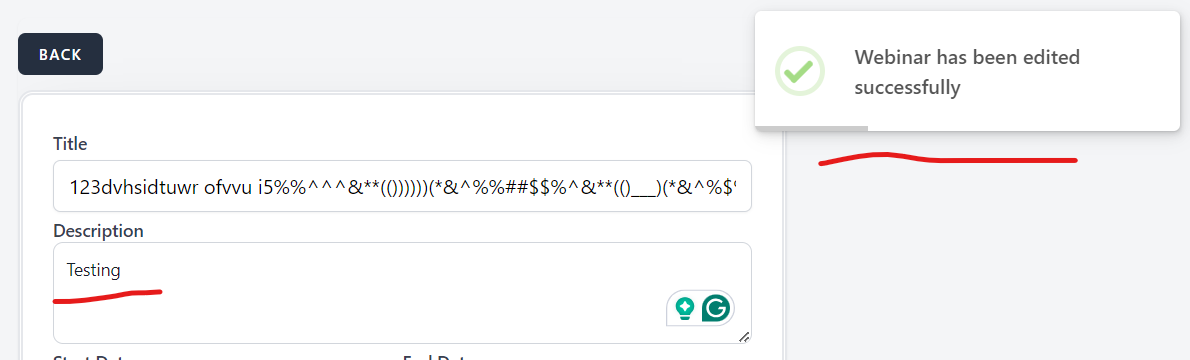
When a user edits the Webinar description by entering an invalid input length, less than 10 or more than 500 characters, and clicks on "Edit", the change is saved.
Steps to reproduce:
1. Log in in https://qainterrapt.brainster.xyz
2. Open Webinars page
3. Click on edit button (in the form of a pencil symbol) on any Webinar
4. Edit Webinar description with invalid input of less than 10 characters
5. Click "Edit" and observe
6. Click on "Back" button
7. Click on edit button (in the form of a pencil symbol) on any Webinar
8. Edit Webinar description with invalid input of more than 500 characters
9. Click "Edit" and observe
Expected result: Webinar description should accept Alphabetic characters (both, Latin and Cyrillic), all letter cases (lower and upper), special characters and spaces. It should be minimum 10 and maximum 500 characters in length.
Actual result: When you edit the Webinar description with invalid input length (less than 10 or more than 500 characters), , webinar is edited and success message is sown on the screen “Webinar has been edited successfully”.
*Environment:- https://qainterrapt.brainster.xyz/webinars
Version of OS – Version 127.0.6533.73 (Official Build) (64-bit)
Browser | Google Chrome
Files