Bug #2760
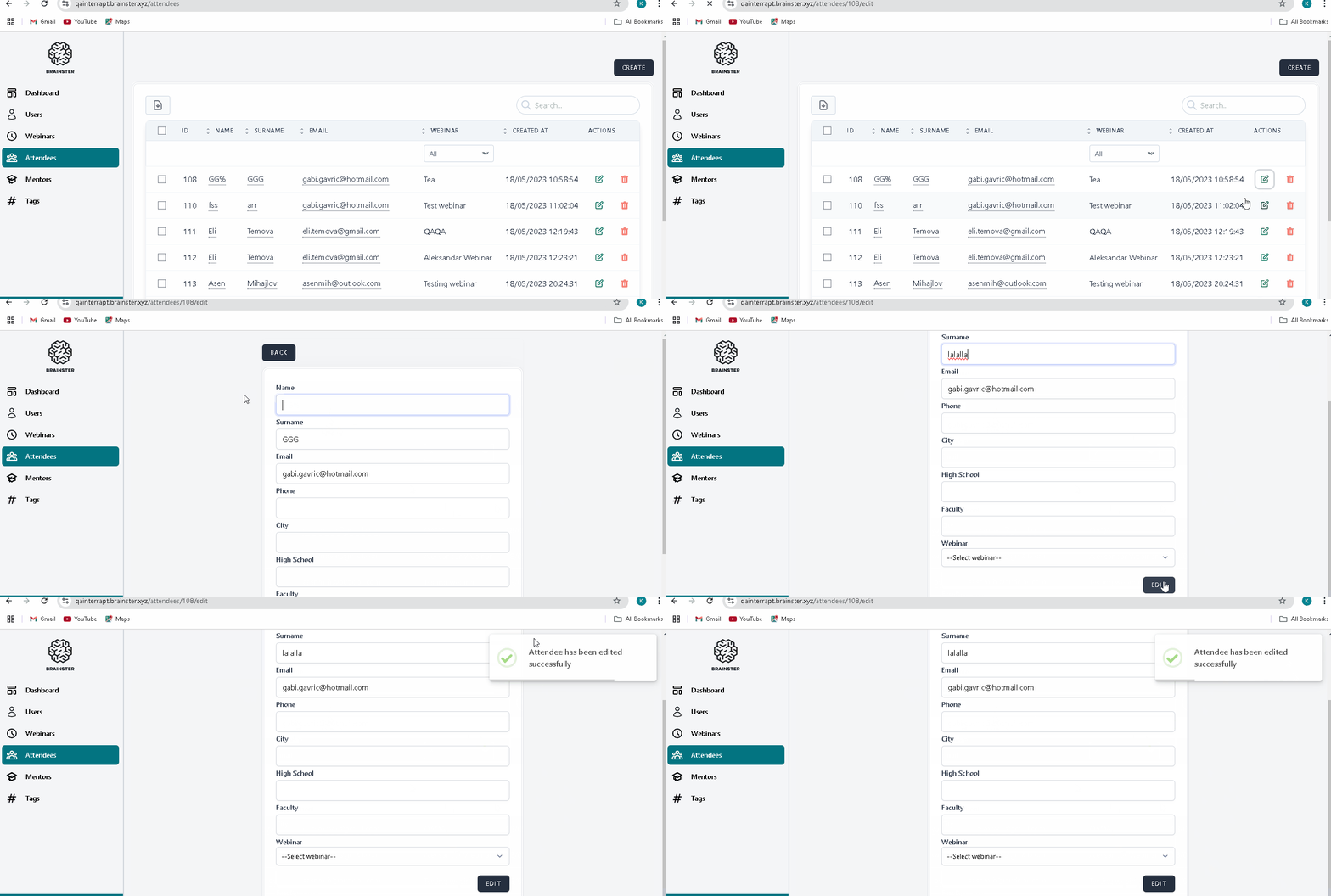
open[Attendees] User can edit any attendee by clicking the 'EDIT' button, although this should be restricted to editing only their own attendee information.
0%
Description
Environment:
"https://qainterrapt.brainster.xyz/login"
Browser:
PC/Microsoft Windows 11 V. 23H2 (OS Build 22631.4460)/ Version 131.0.6778.86 (official Build) (64-bit)
PC/Microsoft Windows 11 V. 23H2 (OS Build 22631.4460)/ Version 131.0.2903.70 (official Build) (64-bit)
Apple iPhone 14 pro/ iOS Version 18.1.1 (22B91)/ Safari 18.1 on iOS 18.1 (24-bit)
Pre-conditions:
The User is logged in as a regular user on the "Attendees" page, with records of attendees that can be edited.
Steps to reproduce:
1. Login as a regular user.
2. Click on the "Attendees" menu.
3.Find a record from the precondition.
4. Click on the green 'EDIT' button.
5. Observe the Action.
Expected Result:
The 'EDIT' button should be disabled or hidden for regular users, and only accessible to them for editing their own attendee information.
Actual Result:
Regular users are able to click the 'EDIT' button and edit attendee information for other users, although this action should be restricted to editing only their own attendee information.
Files