Improvement #2965
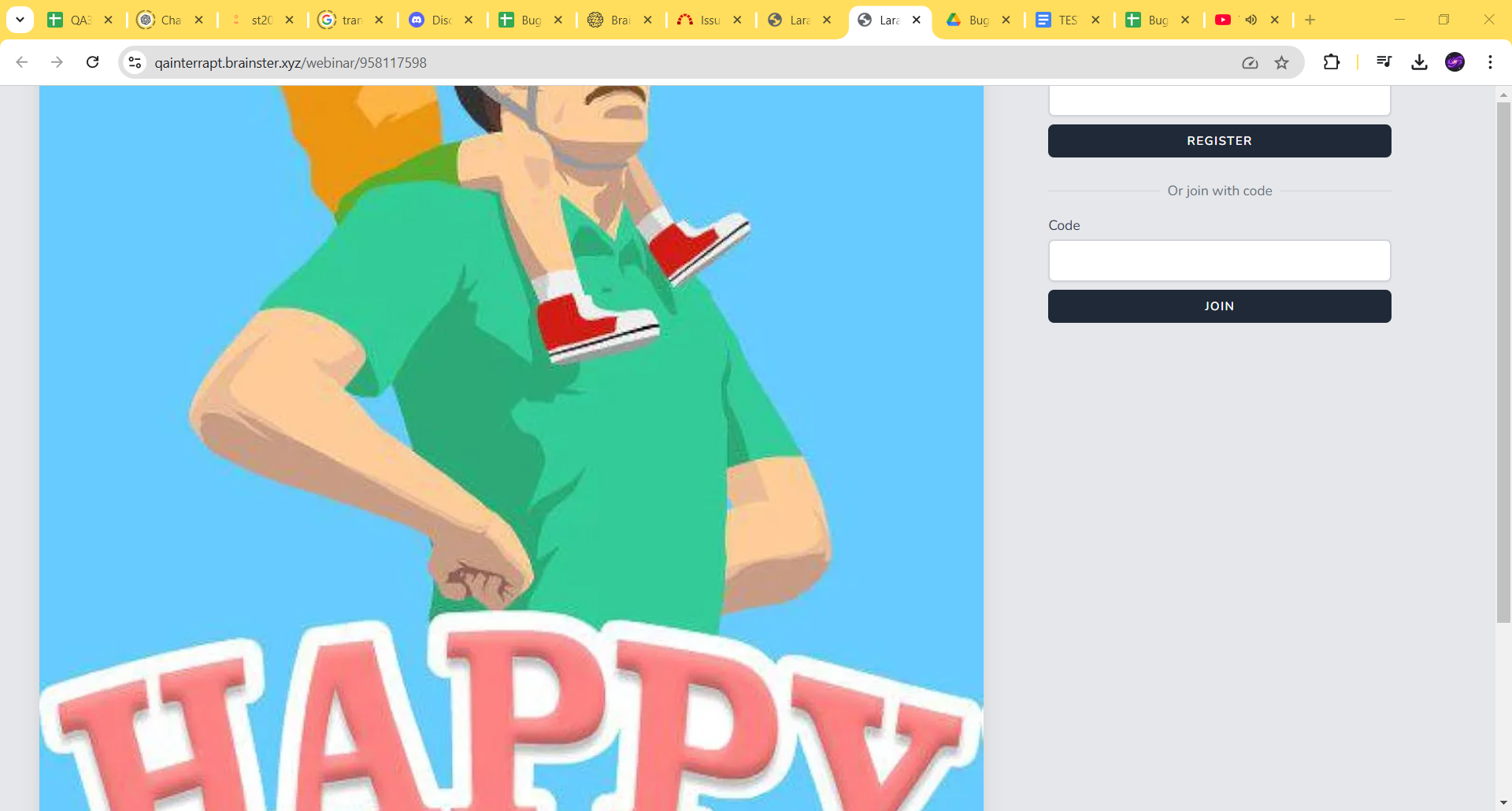
open[Webinars] If the webinar photo is too big some of the elements may be hidden.
0%
Description
The login screen for the webinar
itself is tied to the webinar photo size,
i.e. if the webinar photo is too big some
of the elements may be hidden.
Environment
Test
https://qainterrapt.brainster.xyz/login
PC/ Windows10 Version 22H2/ Google Chrome Version 131.0.6778.140 (Official Build) (64-bit)
Mobile device/Samsung S21 Ultra/ Samsung Internet/ Android version 14, One UI version 6.1.
Resolution size: 1920x1080
Zoom level: 100%
Steps to reproduce
1. Log in to the system
2. Navigate to the Webinars page
3. Create Webinar
4. Search created Webinar
5. Open the link
Expected Result
The login screen for the webinar is opened and the user can filled the fields.
Actual Result
Some elements of the the login
screen for the Webinars is missing.
Attachment
https://drive.google.com/file/d/1m5zrjNkpYh4wNQoanOrK1SGkVPLNsf1x/view?usp=sharing
Files