Actions
Bug #3029
open[Tags] The buttons for further actions are not visible in the 'Delete' pop-up dialog
Start date:
06/09/2025
Due date:
% Done:
0%
Estimated time:
Description
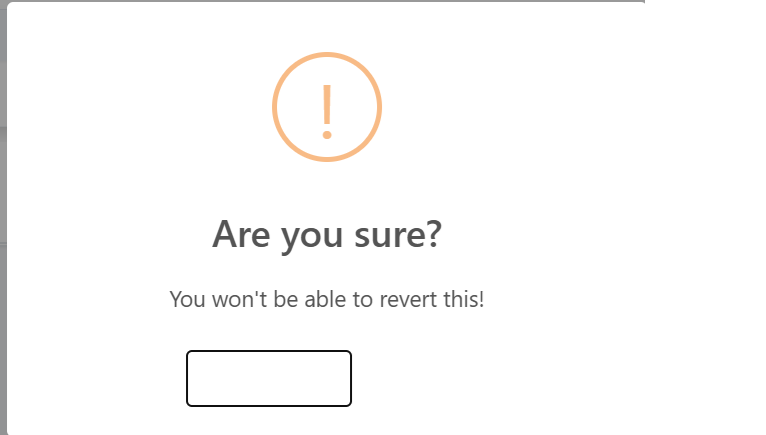
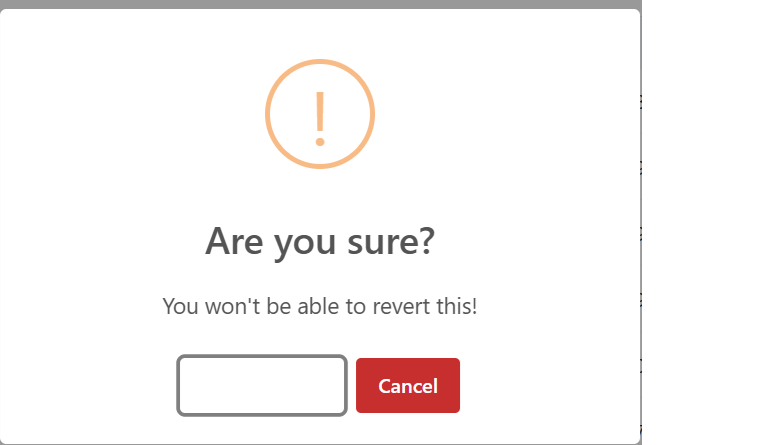
By clicking the delete icon in order to delete the tag, a pop-up dialog appears where the two buttons which are meant to delete or cancel the delete process are not visible, they are visible only when the user hovers over the fields where the buttons should be visible
Environment
Google Chrome Version 137.0.7151.69 (Official Build) (64-bit)
Windows 11 Pro
https://qainterrapt.brainster.xyz/login
- The user must be logged in
- The tag must be created"
- Log in to the system
- Navigate to the the 'Tags' page
- Click on the 'Tags' page from the navigation menu
- Click on the red 'Delete' icon located further right in the row of the created tag
- The user should log in
- The 'Tags' button should be clickable and the user should be redirected to the 'Tags' menu
- A pop-up dialog with a confirmation and cancelation button for the delete form should be visible
- The user logs in succesfully
- The 'Tags' navigation menu is visible and when clicked the user is redirected to the 'Tags' page
- A pop-up dialog appears with no visible buttons for further actions
Files
| Delete bug.png (14.5 KB) Delete bug.png | |||
| Delete bug 2.png (17.7 KB) Delete bug 2.png |
Actions