Bug #3036
open[Users] Username can be edited without meeting the required validation criteria.
0%
Description
The system allows users to edit and save their username even when it does not meet the specified validation rules. User name can accept less than 7 characters, more than 50 characters, non-alphabetic characters (Arabic, Chinese), all special characters and spaces.
Environment
- Device: [Desktop Computer]
- OS: [Windows 11 Pro]
- Screen resolution: [1920x1080]
- Browser: [Chrome 137.0]
- https://qainterrapt.brainster.xyz/login
Steps to reproduce
- Navigate on the "Users" form
- Hover over the three dots(more options) in the bottom left corner next to the username.
- Click on "Your Profile" option
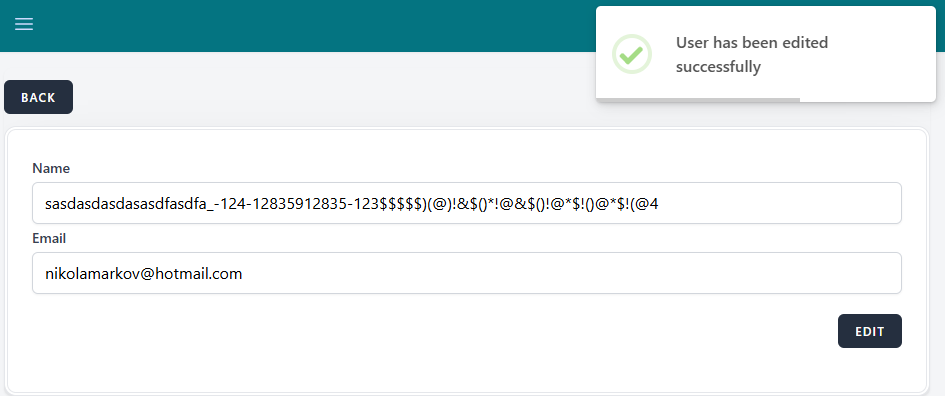
- Enter invalid data in the 'Name' field (eg. Asd, or qowirjqwoHW UIqwrhqiwurqwoq woegpwjegqweguqweghiwu1298y 4123_@&$*
$$$&^*$复制粘نسخ لصق) - Click on the "Save" button
- Observe the form with the updated name and a validation message in the top right corner.
Expected Result
The name should not be saved and the system should display a validation error if the name does not meet the defined criteria. The name must contain only Alphabetic characters(Latin and Cyrillic), predefined special characters (hyphen(-) and period(.)), spaces and must be between 7 and 50 characters in length.
Actual Result
The system allows the name to be saved even when it does not meet the validation criteria, without showing any error or blocking the action. Names containing Arabic and Chinese characters, all types of special characters (e.g., $ %), spaces, or names with less than 7 or more than 50 characters are accepted.
A success message appears stating that the name was edited successfully, even though the input is invalid.
Files