Actions
Bug #3075
open[Mentors] Mentor created with invalid character
Start date:
06/11/2025
Due date:
% Done:
0%
Estimated time:
Description
Description
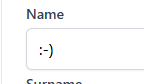
Mentor is created with invalid character in the name field
Environment
PC / Windows 10 pro Version 2009 / Google Chrome Version 137.0.7151.103 (Official Build) (64-bit)
Steps to reproduce
- Login to the system.
- Navigate to the Mentors section.
- Click on the 'CREATE' button.
- Enter invalid character in the name field (<, >, @, !, +, ?, :, ...).
- Save the mentor by clicking on the 'CREATE' button.
- Observe the created mentor.
Expected result
The Mentor shouldn't have been created with invalid characters.
Actual result
The Mentor was created with invalid character in the name field.
Files
Updated by Milan A about 1 year ago
- File deleted (
nama with invalid characters.png)
Updated by Milan A about 1 year ago
Updated by Milan A about 1 year ago
- Subject changed from Mentor created with invalid character to [Mentors] Mentor created with invalid character
Actions