Bug #414
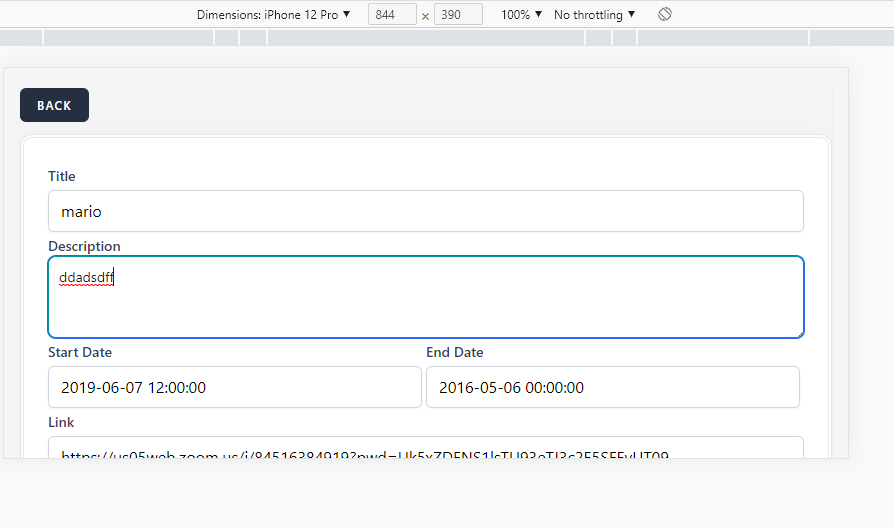
openUser is able to enter ivalid start and end dates.
0%
Description
Environment: - Version of OS – iOS 16.5
- Browser – Google Chrome Version 113.0.5672.127 (Official Build)
- Device: Iphone 12 pro
- Navigate to: https://qainterrapt.brainster.xyz/login
Preconditions:
- The user must have registrated account as admin user
- The user must be logged in
Steps to reproduce: 1. Click on hamburger menu displayed on the top left side of the main page.
2. Hover the Webinars field and click on 'Webinars'.
3. Click on green icon for 'Edit' displayed on the right side of the Webinar which need to be edited.
4. Fill in edit 'Webinar' form with valid credentials for 'Title', 'Description', 'Link', 'Image', 'Mentors', 'Tag'.
5. Click on 'Start/End' input field
6. Enter/Select invalid credentials for 'Start/End Date' calendar and time picker field.
Expected results:
-User is able to edit Webinar, when for 'Start/End Date' calendar and time picker field the user must enter/select valid data the format of the selected date and time should be displayed as "YYYY-MM-DD hh:mm AM/PM".
Actual results:
-User is edited, with entered/selected invalid calendar and time picker data (e.g. Start Date: 2019-06-07 12:00:00/ End Date: 2016-05-06 00:00:00).
Files