Actions
Bug #438
open[Webinars] Navigation buttons in the paginaton are displayed inconsistently
Start date:
06/10/2023
Due date:
% Done:
0%
Estimated time:
Description
Description:
Steps To Reproduce:
1. Navigate to https://qainterrapt.brainster.xyz/
2. Log in with valid credentials
3. Click on the hamburger menu in the upper left corner
4. Select webinars by clicking on it
5. In the bottom of the page, select pages 2, 3, 4 or 5 by clicking on the corresponding buttons, or navigating with the < and > buttons
Expected Result
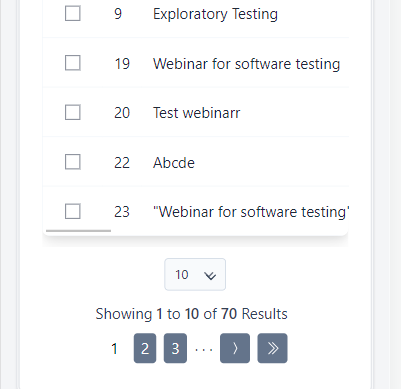
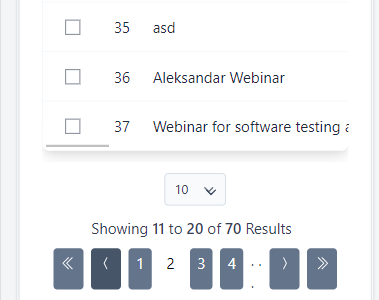
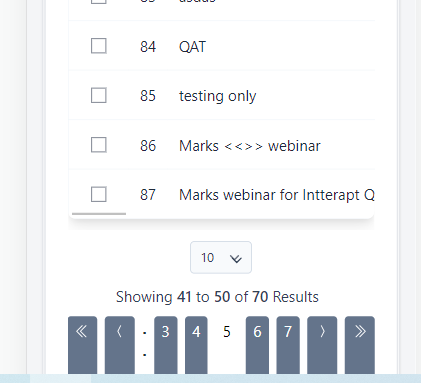
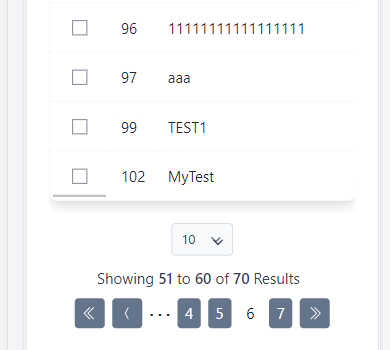
The buttons in the paginators menu should be displayed identically on each page
Actual Result
The buttons in the paginators menu on page 1,6 and 7 are displayed differently than the buttons on page 2, 3, 4 and 5
Environment Safari iPhone IOS 13.2
Files
| Screenshot_6.png (11.3 KB) Screenshot_6.png | |||
| Screenshot_7.png (9.43 KB) Screenshot_7.png | |||
| Screenshot_8.png (14.7 KB) Screenshot_8.png | |||
| Screenshot_9.png (8.56 KB) Screenshot_9.png |
Actions