Bug #461
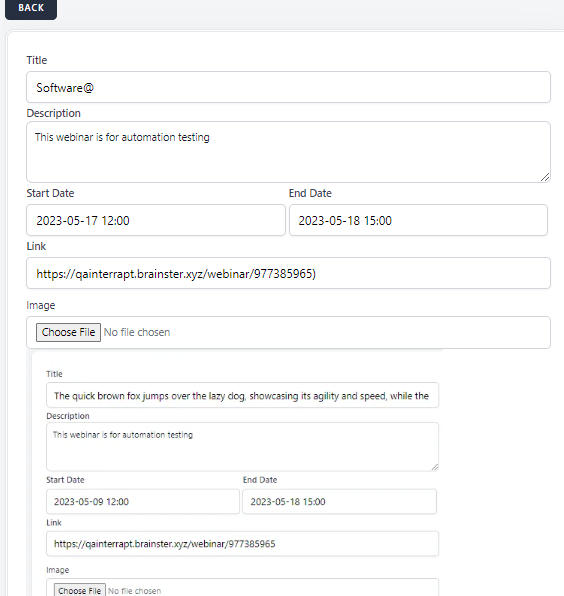
open[Webinar ]User is able to input different special character than “-” and “.” in title field
0%
Description
Environment
Samsung galaxy A51
Google Chrome Version 114.0.5735.110 (Official Build) (64-bit)
*Description
Steps to reproduce
1.Open browser
2.Navigate to url(https://qainterrapt.brainster.xyz/webinars/create)
3.Log in with existing account(username:[email protected];passwoer:******)
4.Click on webinar icon from the left side menu
5.click on upper corner black marked "Create" button
6.click on Title field
7.write number in tittle field("Software@")
8. input characters with length between 10 and 500 letters in Description field ("This webinar is for automation testing")
9 click on start date field
10.select start date and time from displayed date and time picker in valid form as following "YYYY-MM-DD hh:mm AM/PM” in start date field (2023-05-17 12:00)
11.click on end date field
12.select end date and time from displayed date and time picker in valid form as following "YYYY-MM-DD hh:mm AM/PM” in end date field (2023-05-18 15:00:00)
13.click on link field
14.input link in valid form such as "http://" or https:// in link field (https://qainterrapt.brainster.xyz/webinar/977385965)
15.click on "choose file" button in image field
16.select image from your computer
17.click on mentor field
18.choose mentor(Test Testing)
19.click on tag field
20.choose tag(Mobile Tag)
Expected result
User should not be able to create webinars by inputting different special character than “-” and “.” in title field
Actual result
User is able to create webinars by inputting different special character than “-” and “.” in title field
Files