Bug #485
open
[Webinars]The date picker disappear
Added by Goran Brnjarchevski about 3 years ago.
Updated about 3 years ago.
Description
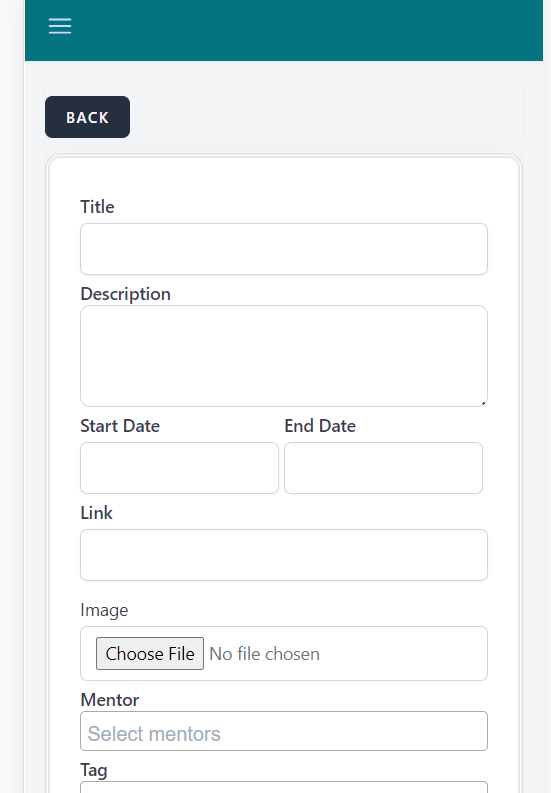
Description: When creating a webinar, the date pickers in Start-date disappear whenever a character is entered in the title field
Steps To Reproduce:
1. Navigate to the url https://qainterrapt.brainster.xyz/
2. Log in with valid credentials
3. Click on the hamburger menu in the top left corner
4. Select webinars from menu
5. In the top right corner click on the CREATE button
6. Click on the title field
Expected Result
The start date should contain a date picker
Actual Result
The start date does not contain a date picker
Enviorenment Samsung Galaxy S20 Ultra Opera Version:99.0.4788.47
Files
- File clipboard-202306112234-cpdji.png added
- File clipboard-202306112234-xympw.png added
- File Screenshot_2.png Screenshot_2.png added
- Subject changed from ating a webinar, the date pickers in Start-date disappear whenever a character is entered in the title field to The date pickers disappear when creating a webinar
- Description updated (diff)
- Assignee set to Goran Brnjarchevski
- File deleted (
clipboard-202306112234-cpdji.png)
- File deleted (
clipboard-202306112234-xympw.png)
- Description updated (diff)
- Description updated (diff)
- Subject changed from The date pickers disappear when creating a webinar to [Webinars]The date pickers disappear
- Description updated (diff)
- Subject changed from [Webinars]The date pickers disappear to [Webinars]The date picker disappear
- Description updated (diff)
Also available in: Atom
PDF