Actions
Bug #602
open[Create Webinar] Unable to Enforce The Image Size Limit of 5MB
Start date:
06/14/2023
Due date:
% Done:
0%
Estimated time:
Description
- Environment:
OS - Windows 10
Browser: Microsoft Edge -Version 114.0.1823.43 (Official build) (64-bit)
https://qainterrapt.brainster.xyz - Description:
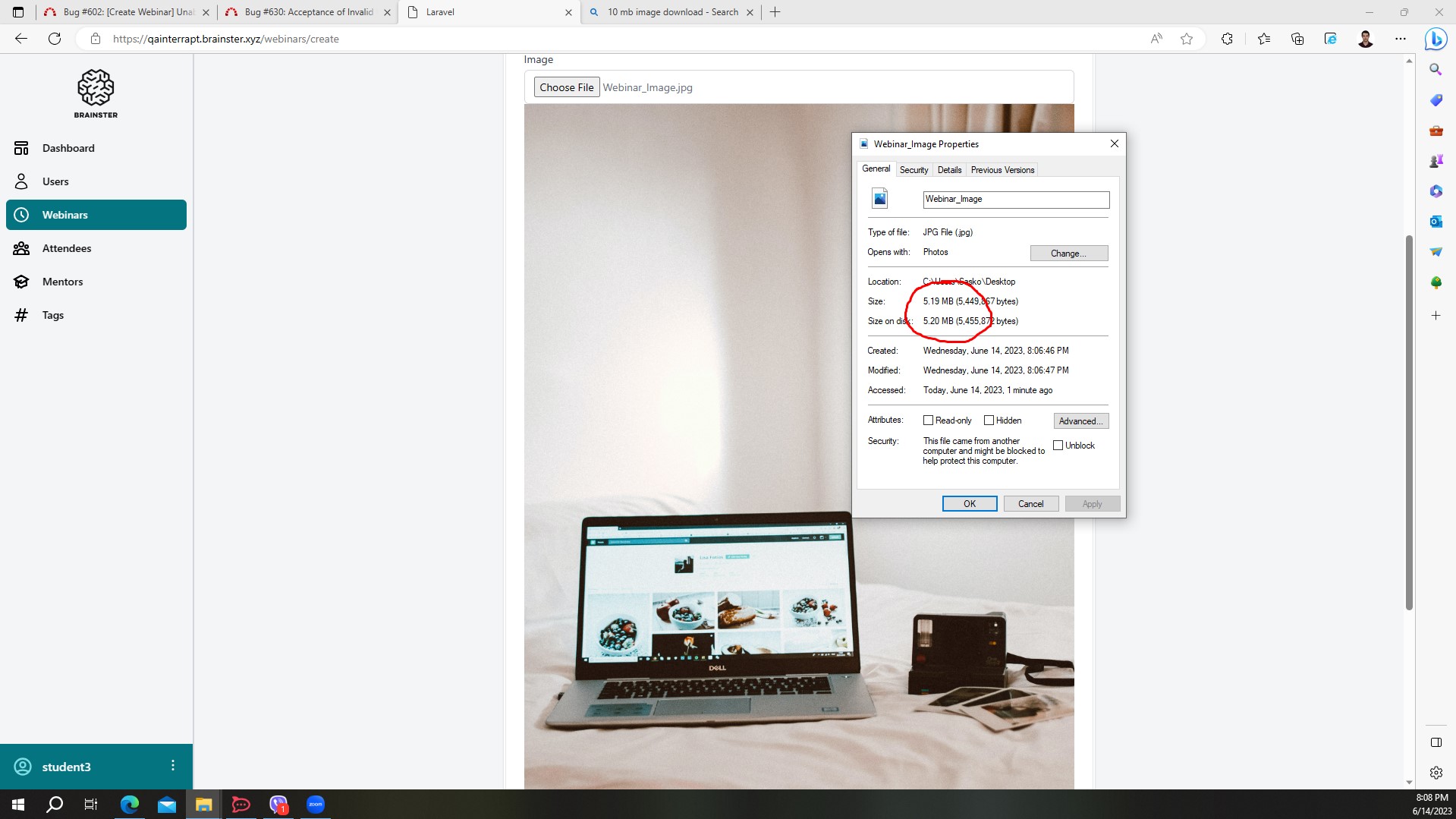
During testing of the image upload feature, it was observed that the application allows users to upload images larger than the specified size limit of 5MB . This behavior contradicts the requirement, which states that users should not be able to insert an image exceeding 5MB in size. - Steps to Reproduce:
1. Navigate to "Webinars".
2. Click on ""Create"" button.
3. Fill all the fields, ( With valid information ).
4. Select an image Larger than 5 MB.
5. Click the "Create" button.
6. Observe the system's response. - Actual Result:
The system accepted and processed the image file larger than 5MB without displaying any error message or validation. - Expected Result:
The system should display an error message indicating that the image size exceeds the maximum allowed size limit of 5MB, and prevent the user to create the webinar.
Files
Updated by Nikola Stojkoski almost 3 years ago
- Subject changed from Unable to Enforce Image Size Limit of 5MB to [Create Webinar]Unable to Enforce Image Size Limit of 5MB
Updated by Nikola Stojkoski almost 3 years ago
- Subject changed from [Create Webinar]Unable to Enforce Image Size Limit of 5MB to [Create Webinar] Unable to Enforce Image Size Limit of 5MB
Updated by Nikola Stojkoski almost 3 years ago
- File Bug_Prove.jpg Bug_Prove.jpg added
- Subject changed from [Create Webinar] Unable to Enforce Image Size Limit of 5MB to [Create Webinar] Unable to Enforce The Image Size Limit of 5MB
- Description updated (diff)
This issue poses a risk as it can lead to excessive storage consumption, performance degradation, and potential system instability.
Actions