Actions
Bug #602
open[Create Webinar] Unable to Enforce The Image Size Limit of 5MB
Start date:
06/14/2023
Due date:
% Done:
0%
Estimated time:
Description
- Environment:
OS - Windows 10
Browser: Microsoft Edge -Version 114.0.1823.43 (Official build) (64-bit)
https://qainterrapt.brainster.xyz - Description:
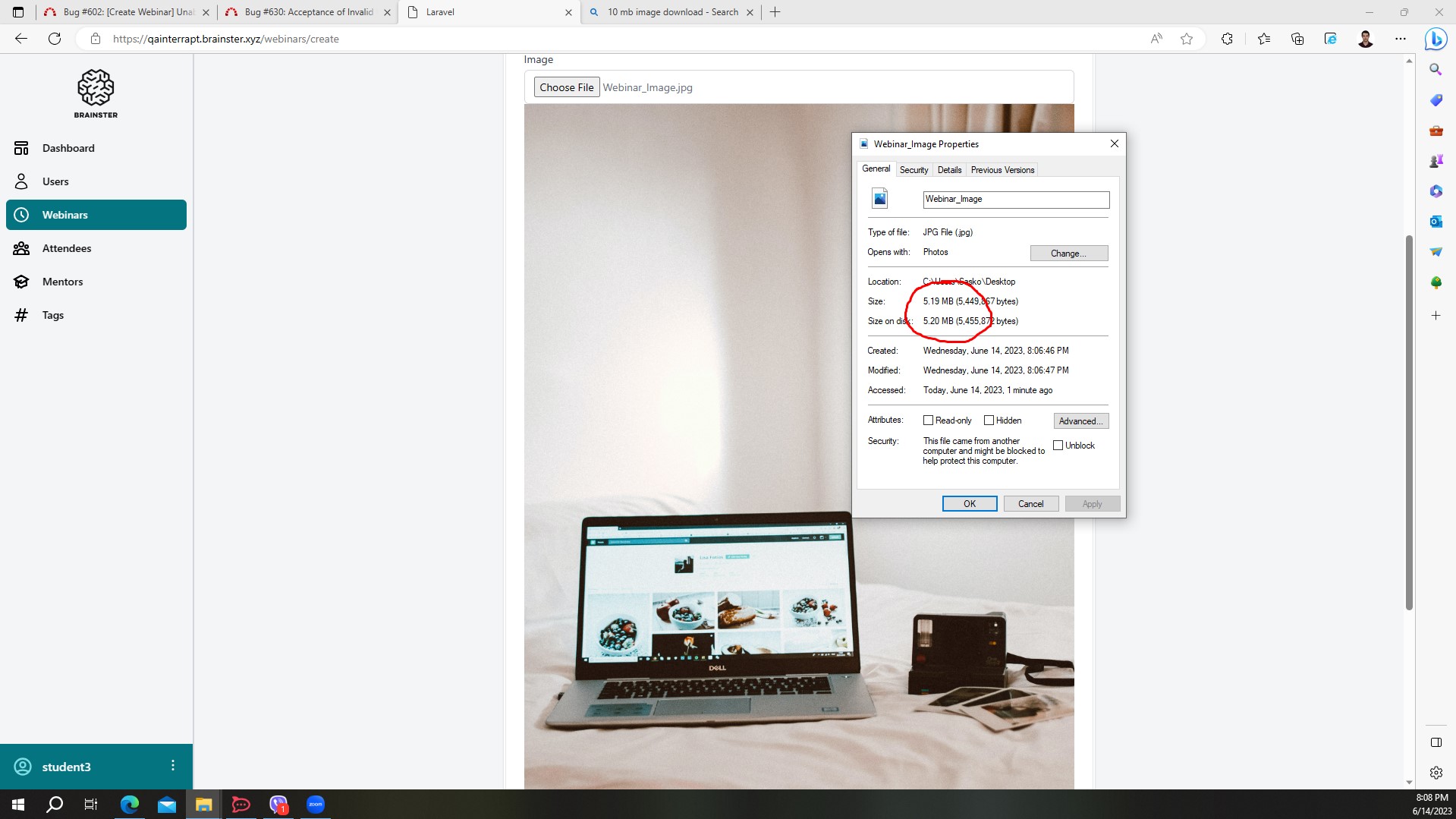
During testing of the image upload feature, it was observed that the application allows users to upload images larger than the specified size limit of 5MB . This behavior contradicts the requirement, which states that users should not be able to insert an image exceeding 5MB in size. - Steps to Reproduce:
1. Navigate to "Webinars".
2. Click on ""Create"" button.
3. Fill all the fields, ( With valid information ).
4. Select an image Larger than 5 MB.
5. Click the "Create" button.
6. Observe the system's response. - Actual Result:
The system accepted and processed the image file larger than 5MB without displaying any error message or validation. - Expected Result:
The system should display an error message indicating that the image size exceeds the maximum allowed size limit of 5MB, and prevent the user to create the webinar.
Files
Actions